Break-Even Stop: When to Move Your Stop Loss to Entry, and How in MT5
Have you ever had a trade in profit, only to see it reverse and hit your stop loss?
In short, a break-even stop means moving your stop loss to the price you entered at (the entry price) once the trade is in profit, so the loss disappears. But if you do not set the rule for moving it in advance, a small pullback can close the trade.
This article covers a profit and loss example, when to move the stop, where to place it once commission is included, and the MT5 steps.
Key takeaways
- A break-even stop moves your stop loss to the entry price once the trade is in profit, removing the loss.
- With a 0.1-lot buy at 1.1000 and the stop moved at +20 pips, the worst case is 0 USD if it fills at the specified price.
- On a Monaxa Zero account, placing the stop 0.7 pips on the favorable side to cover the 0.7 USD round-turn commission brings the result to about 0 including commission.
In short: a break-even stop moves your stop loss to entry to remove the loss
- Once the trade is in profit, you move the stop loss to your entry price, so the worst case is about zero, provided it fills at the price you set
- Decide before you enter how far price must go before you move it
- Move it too early and a small pullback closes the trade at entry, so you miss the move that follows
- In sudden moves or gaps, the order can fill at a price worse than entry, so the result is not always exactly zero
A break-even stop example: three outcomes (before moving, closed at entry, take profit)
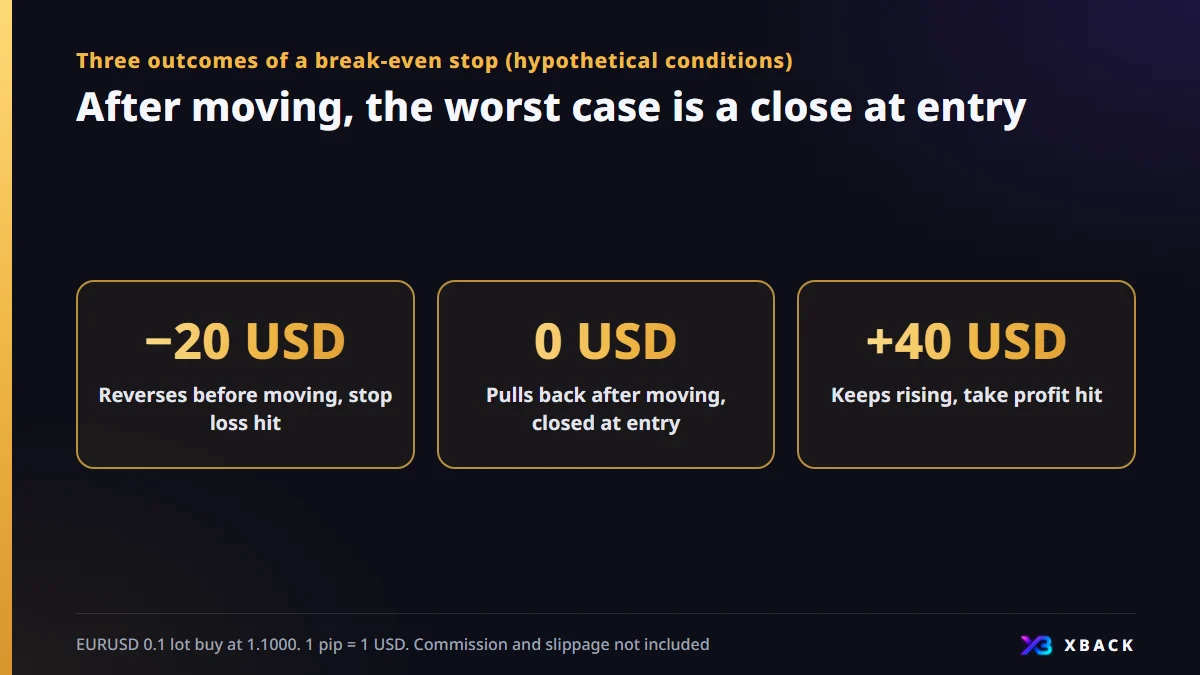
This is a hypothetical example on a USD account: you buy 0.1 lot of EURUSD at 1.1000. At 0.1 lot, 1 pip equals 1 USD, so the number of pips is the USD amount.
The stop loss is at 1.0980 (−20 pips) and the take profit at 1.1040 (+40 pips). When the floating profit reaches +20 pips (1.1020), you move the stop loss to 1.1000.
| Scenario | Exit price | Result |
|---|---|---|
| Price reverses before you move it, stop loss hit | 1.0980 | −20 USD |
| Price pulls back after you move it, closed at entry | 1.1000 | 0 USD |
| Price keeps rising, take profit hit | 1.1040 | +40 USD |
If the stop fills at the price you set, the worst case after moving it is a close at entry. The −20 USD worst case disappears, but in return a pullback can close the trade before it reaches +40 USD.
If price jumps, for example on a Monday gap, the stop fills at a worse price than entry. The result is then below 0 USD.
How to decide when to move to break-even
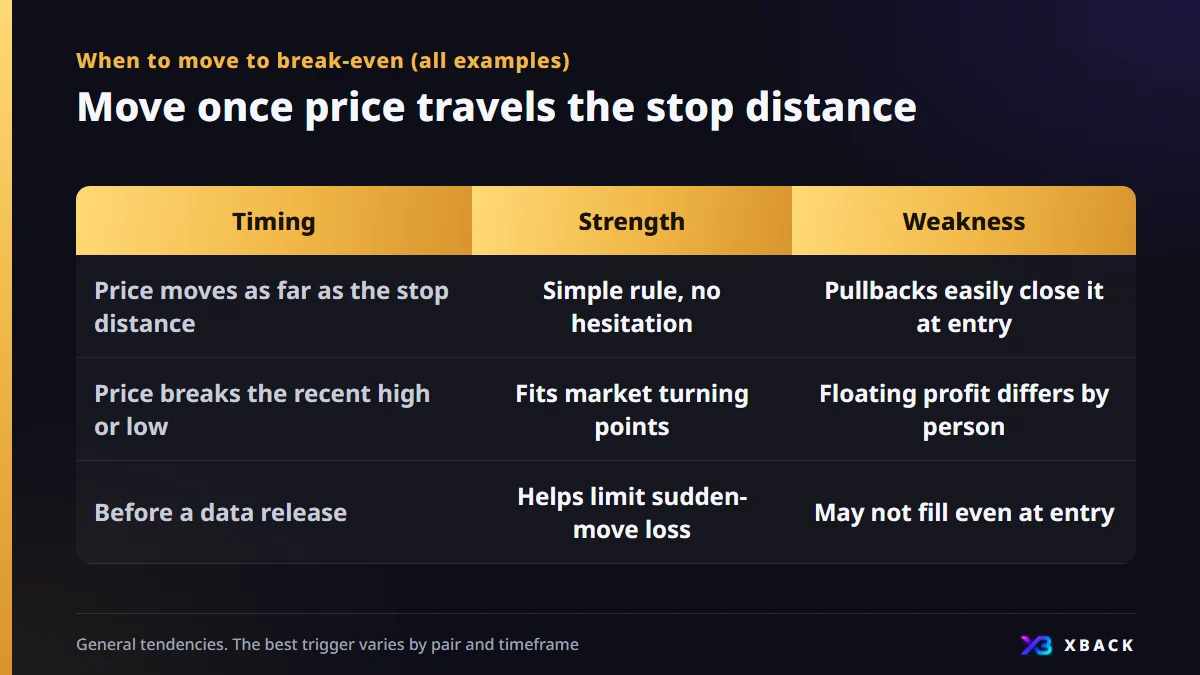
There is no single correct trigger. Here are three common ones, applied to the earlier example (20-pip stop). All are examples.
| Timing | Position in the example | Strength | Weakness |
|---|---|---|---|
| Price moves as far as the stop distance | +20 pips (1.1020) | Simple rule, no hesitation | A normal pullback easily closes it at entry |
| Price breaks the recent high or low | Judged on the chart | Fits the market's turning points | Floating profit at that moment differs by person |
| Before a data release | Just before the release | Helps limit loss from a sudden move | In a sudden move, it may not fill even at entry |
Moving the stop after price travels as far as the stop distance means you protect the trade once it reaches 1x your risk. For positions held into a data release, Managing positions before news releases compares four options.
Where to place it, including commission and spread
Even if you place the stop exactly at entry, the whole trade ends in a loss on an account that charges commission. Placing it slightly on the profit side by the commission amount brings the result to about zero including commission.
- Example: Monaxa's Zero account charges 3.50 USD commission per lot, per side
- A 0.1-lot round turn therefore costs 3.50 USD × 2 × 0.1 = 0.7 USD
- At 0.1 lot, 1 pip = 1 USD, so 0.7 USD equals 0.7 pips
- For a buy at 1.1000, place it at 1.10007, 0.7 pips above entry, for about zero including commission
- For a sell, it is the other way: if you sold at 1.1000, place it at 1.09993, 0.7 pips below
A buy position is closed on the Bid, and a sell position on the Ask. A sell stop loss triggers if the Ask reaches it, even before the chart's Bid does. On instruments with a wide spread, watch this gap.
On a Monaxa Zero account opened through XB, you also get 1 USD cashback per round-turn lot, so 0.1 USD on this 0.1-lot trade. Cashback is credited to your account afterward; it is not part of the exit price.
How to move your stop loss to break-even in MT5
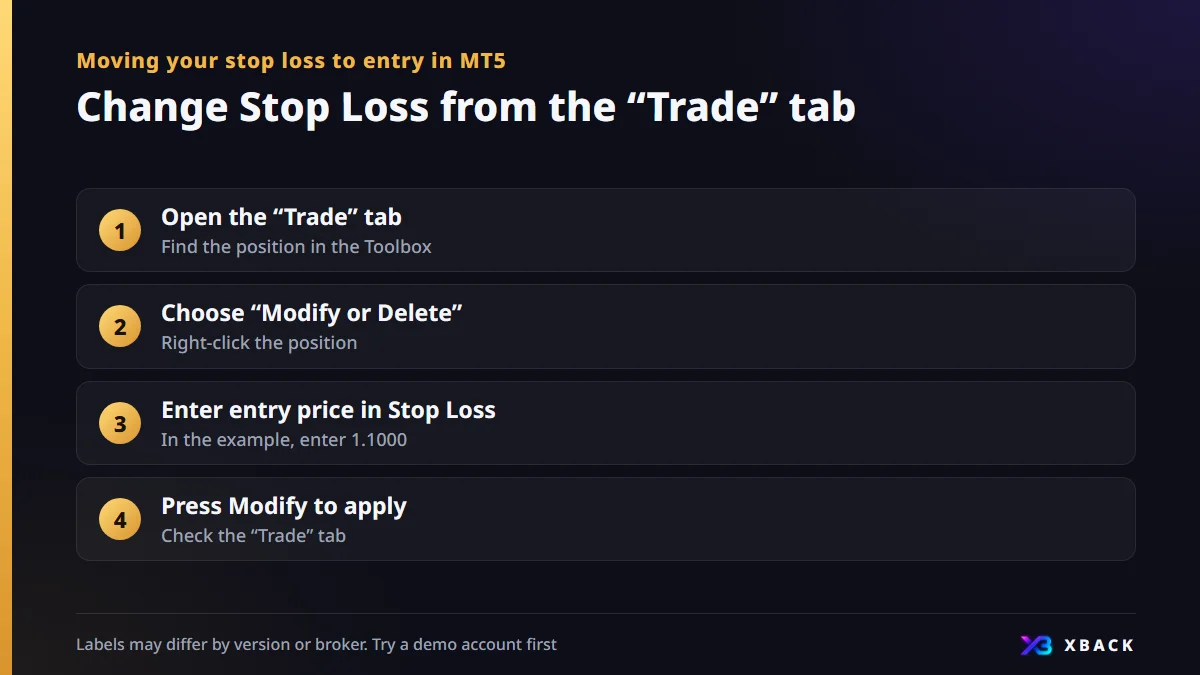
In MT5, the stop loss appears as “Stop Loss”. From the “Trade” tab of the Toolbox, you change the position's Stop Loss to the entry price.
- 1
Find the position in the “Trade” tab
In the desktop version of MT5, your current positions appear in the “Trade” tab of the “Toolbox” window.
- 2
Right-click and choose “Modify or Delete”
Right-click the position and choose “Modify or Delete” from the context menu.
- 3
Enter the entry price in Stop Loss
In the “Modify Position” window that opens, enter the entry price (1.1000 in the example) in “Stop Loss”.
- 4
Press the Modify button to apply
Pressing the button rewrites the Stop Loss. Check that the “Trade” tab now shows the new value.
Downsides of a break-even stop, and how it differs from a trailing stop
- If you move it too early, a normal pullback closes the trade at entry and you miss the move that follows
- With commission or spread, a close at entry can still be a small loss once costs are included
- In sudden moves or gaps, the order can fill at a price worse than entry
- Feeling safe after moving the stop can lead you to abandon your original take-profit plan
A break-even stop moves the stop loss once, to one chosen point. A trailing stop moves the stop loss continuously as price moves. See How to use a trailing stop for how the two differ.
Enter the currency pair, lot size, entry price and exit price to see profit and loss in USD. Compare it with the numbers in the example.
Calculate your profit and lossFAQ
Q.What is a break-even stop?
It is a method of moving your stop loss to the price you entered at once the trade is in profit. If price then pulls back, the trade closes at entry and the result is about zero. Commission and slippage are separate.
Q.Can a break-even close still be a loss?
Yes. On an account that charges commission, placing the stop exactly at entry leaves you down by the commission amount. In sudden moves or gaps, the order can also fill at a price worse than entry.
Q.When should I move my stop loss to break-even?
There is no single correct answer. Common approaches are to move it after price travels as far as the stop distance, after it breaks the recent high or low, or before a data release. It is important to decide the rule before you enter.
Q.How do I move my stop loss to break-even in MT5?
Right-click the position in the “Trade” tab of the “Toolbox” and choose “Modify or Delete”. Enter the entry price in “Stop Loss” in the “Modify Position” window and apply it. You can also drag the line on the chart.
Q.How is a break-even stop different from a trailing stop?
A break-even stop moves the stop loss once, to the entry price. A trailing stop moves the stop loss continuously as price moves. MT5's trailing stop runs on the terminal side, so it stops following when you close MT5.
Sources
- MetaTrader 5 Help “Performing trading operations” (trade operations, modifying positions) (checked 2026-11-11)
- Monaxa account types (Japanese) (checked 2026-11-18)

This article is for information purposes only and is not investment advice. Conditions may change, so please check each broker's official page for the latest information. Offshore FX and CFD trading carries a risk of losses exceeding your principal.