What Is a Trailing Stop? MT5 Setup and How to Choose the Distance
Are you in profit but unsure where to close the trade?
In short, a trailing stop lets you let profits run while limiting how much you give back. In MT5, however, it only works while your terminal is running.
This article covers how it works, how to choose the distance, a worked example, how it differs from a fixed take-profit and the setup steps.
Key takeaways
- A trailing stop is a feature where your stop order follows price automatically when it moves in your favor and never moves in the unfavorable direction.
- The MT5 trailing stop runs on your terminal, so following stops when you close MT5 or your PC shuts down.
- A narrow distance gets closed by pullbacks and a wide one gives back profit, so use ATR or the recent price range as a guide.
In short: a trailing stop is a stop order that chases your profit
- When price moves in your favor, the stop order follows it automatically
- It never moves in the unfavorable direction, so the profit you have locked in is protected
- In MT5 it runs on your terminal, so it stops working when MT5 is closed
- A distance that is too narrow or too wide works against you
What is a trailing stop? How it works
A trailing stop is a feature that automatically raises your stop-loss order (lowers it for a sell) as your unrealized profit grows. The name comes from the English word "trail," meaning to follow behind.
Even if price pulls back, the stop order does not return to its old level. The position it has been raised to becomes your new stop-loss line.
- For a buy, the stop order moves up as price rises
- If price falls, the stop order does not drop and stays where it is
- When price touches the stop order, a closing order is sent
- The timing of the exit is decided automatically by the momentum of the market
The MT5 trailing stop runs on your terminal
In MT5, the trailing stop is moved by your own terminal (MT5), not by the broker's server. So when you close MT5 or your PC shuts down, the trailing stops too.
Only the following stops. A stop order that is already in place remains, but it is not updated beyond that position.
Trailing begins once your unrealized profit exceeds the distance you set. Until then the stop order does not move, so place your first stop-loss yourself.
| Item | Regular stop order | Trailing stop |
|---|---|---|
| What moves it | The server holding the order | The terminal running MT5 |
| Follows price | No (fixed) | Yes (favorable direction only) |
| When MT5 is closed | Stays active as is | Following stops |
If you want it running all day, one option is to keep the terminal running on a VPS or similar. You can read the details in the related column.
How to choose the trailing stop distance
The distance is the gap between the current price and the stop order. This distance largely decides whether a trailing stop works.
| Distance | Upside | Downside |
|---|---|---|
| Narrow | You give back less profit | Normal pullbacks tend to close the trade |
| Wide | It can withstand some pullbacks | A large reversal tends to cut your profit |
Base it on ATR or the recent price range
ATR is an indicator showing the average price range over a set period. If ATR is, say, 10 pips, one approach is to use twice that, 20 pips, as the distance.
You can also measure the size of recent pullbacks and rebounds on the chart. A distance slightly wider than a normal pullback makes it less likely you are stopped out.
Think of it together with your stop-loss distance
Many people use the same distance for the initial stop-loss and the trailing stop. Lot size is decided from that distance and your acceptable loss. The related column on stop-loss placement shows the calculation flow.
Example: following a 0.1-lot EURUSD trade
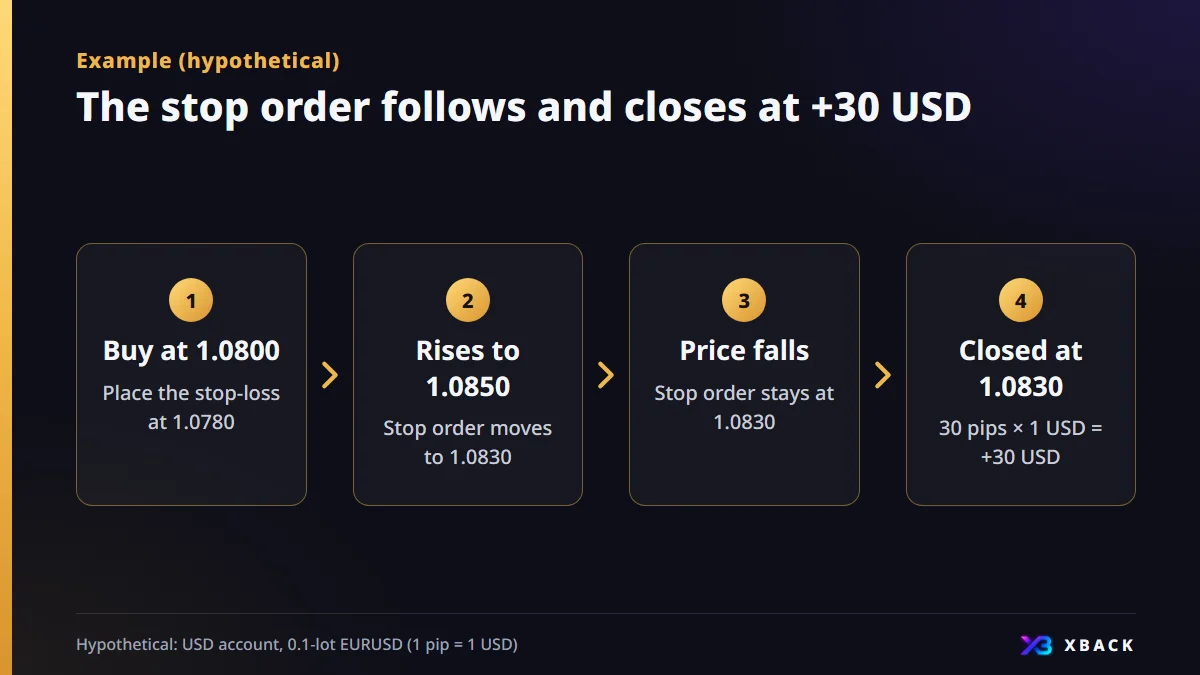
This is an example of buying 0.1 lots of EURUSD in a USD account. At 0.1 lots, 1 pip is 1 USD, so the number of pips equals the amount in USD.
- 1
Buy at 1.0800 with a 20-pip distance
As your initial stop-loss, place a stop order yourself at 1.0780, 20 pips below.
- 2
Price rises to 1.0850
The stop order follows and moves to 1.0830, 20 pips below.
- 3
Price then falls
The stop order does not move and stays at 1.0830.
- 4
Filled and closed at 1.0830
1.0830 − 1.0800 = 30 pips, so 30 pips × 1 USD = +30 USD.
How it differs from a fixed take-profit (limit order)
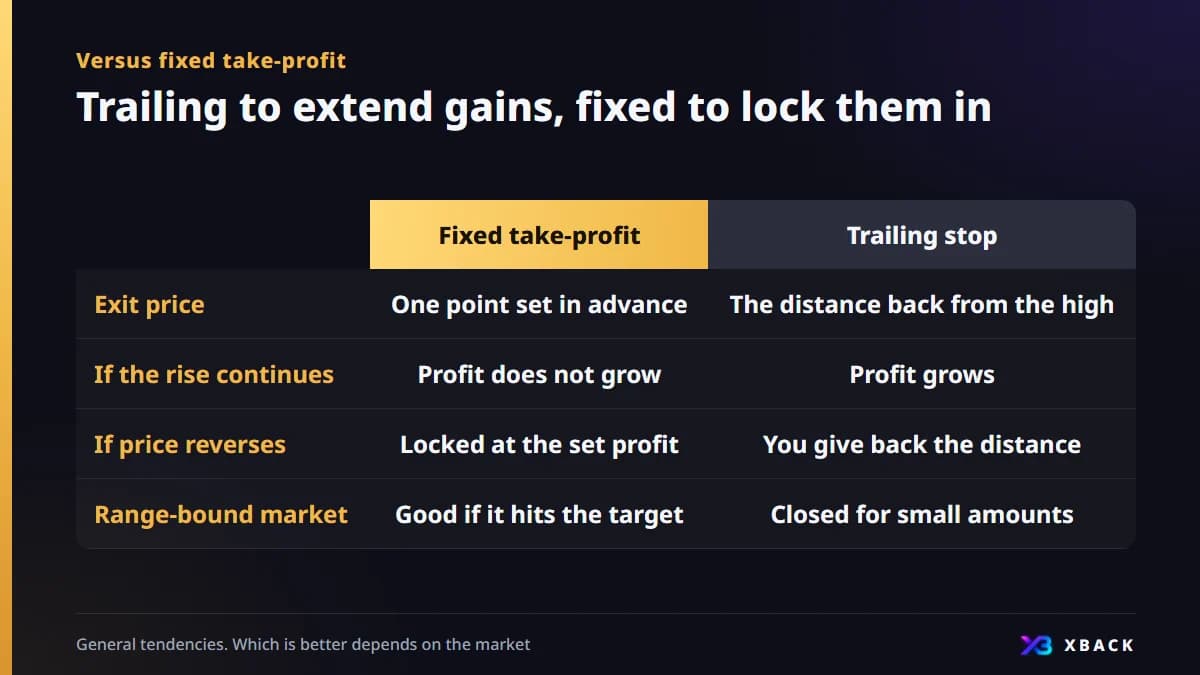
A fixed take-profit always closes at the price you decided. With a trailing stop, profit grows the longer the rise continues, but on a reversal you give back the distance.
| Item | Fixed take-profit | Trailing stop |
|---|---|---|
| Exit price | One point decided in advance | The distance back from the high |
| If the rise continues | Profit does not grow | Profit grows |
| If price reverses suddenly | Locked at the set profit | You give back the distance |
| Range-bound market | Good if it reaches the target | Tends to be closed out for small amounts |
In the earlier example, if price had risen to 1.0900, the stop order would be at 1.0880. Closing there gives +80 pips (80 USD). With a fixed take-profit at 1.0830, it would be +30 pips.
Markets that suit it and markets that do not
| Market condition | Fit | Reason |
|---|---|---|
| A trend running in one direction | Suits it | Pullbacks are shallow, so profit is easier to extend |
| A range moving up and down | Does not suit it | Small reversals close the trade again and again |
| Around indicator releases or sudden moves | Caution | Price is rough and fills beyond the distance are more likely |
How to tell a trend from a range differs by method. It is safer to test on a demo account whether it suits your trading before you use it.
Steps to set a trailing stop in MT5
- 1
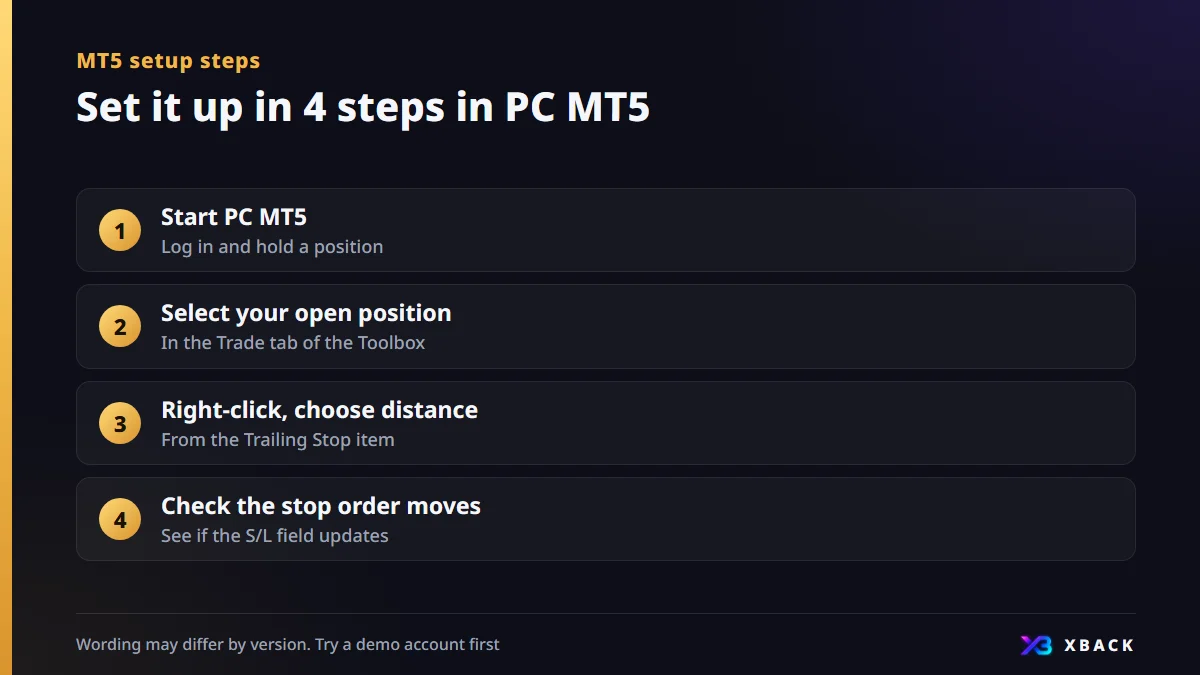
Start the PC version of MT5
While logged in, hold a position.
- 2
Select your open position
Open positions appear in the Trade tab of the Toolbox.
- 3
Right-click and choose the distance
Choose a distance from the Trailing Stop item in the menu.
- 4
Check that the stop order moves
After price moves, see whether the S/L field of the position is updated.
How trailing stops relate to cashback
Many cashback systems calculate returns from your trading volume. Whether trades closed by a trailing stop are eligible needs to be checked with each broker.
Return amounts are not yet confirmed, and we will post them on each broker's page at launch. Avoid using it to increase your number of trades for the sake of returns.
Enter the currency pair, lot size, entry price and exit price to see your profit or loss in USD. Compare it with the figures in the example.
Calculate your profit and lossFAQ
Q.What is a trailing stop?
It is a feature where your stop-loss order automatically follows price when it moves in your favor. It never moves in the unfavorable direction, so it protects the profit you have locked in while still allowing for a continued rise.
Q.Does a trailing stop work if I close MT5?
No. The MT5 trailing stop runs on your terminal. A stop order placed before you closed it remains, but following beyond that point stops.
Q.How many pips should a trailing stop distance be?
There is no fixed right answer. Use ATR or the size of recent pullbacks as a guide and look for a distance that is neither too narrow nor too wide. It also changes by currency pair and timeframe, so test it on a demo account.
Q.Which is better, a trailing stop or a fixed take-profit?
It depends on how the market develops. If a trend continues, profit is easier to extend, but in a range trades tend to be closed for small amounts. It is common to choose between them to suit your method.

This article is for information purposes only and is not investment advice. Conditions may change, so please check each broker's official page for the latest information. Offshore FX and CFD trading carries a risk of losses exceeding your principal.