Pips vs Points: 1 Pip = 10 Points, Conversion and MT5 Input Units
When you set a stop loss in MT5, are you unsure whether to enter pips or points?
In short, on an account that quotes 5 decimal places (3 for yen pairs), 1 pip = 10 points, and MT5 has several fields that are shown in points.
This article covers a conversion table, amounts by lot size, how to check the unit in MT5, and how to prevent input mistakes.
Key takeaways
- On an account that quotes 5 decimal places (3 for yen pairs), 1 pip = 10 points, and a 20-pip stop loss is 200 points.
- For EURUSD at 1 lot, 1 pip is 10 USD and 1 point is 1 USD. At 0.10 lot they are 1 USD and 0.1 USD.
- Typing 20 points for 20 pips makes the distance one tenth as wide, so confirm the unit before you enter it.
In short: pips and points differ by a factor of 10
- On an account that quotes 5 decimal places (3 for yen pairs), 1 pip = 10 points
- A point is the smallest unit of the displayed price, and a pip is 10 times that
- In the MT5 specification, the spread is shown in points
- A 20-pip stop loss is 200 points, and mixing up the units shifts the distance by a factor of 10
Pips and points conversion table: EURUSD and USDJPY
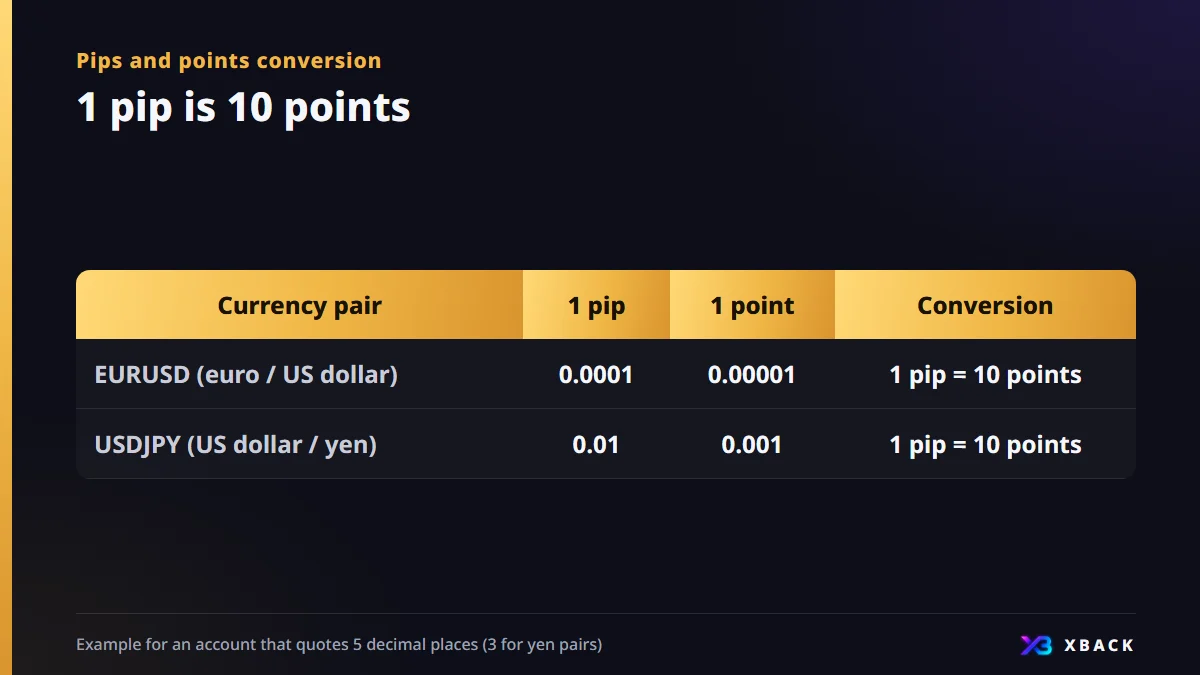
A point is the last digit of the price MT5 displays, and a pip is the digit one place above it. That is why 1 pip equals 10 points.
| Currency pair | 1 pip | 1 point | Conversion |
|---|---|---|---|
| EURUSD (euro / US dollar) | 0.0001 | 0.00001 | 1 pip = 10 points |
| USDJPY (US dollar / yen) | 0.01 | 0.001 | 1 pip = 10 points |
The spread uses the same conversion. A spread of 15 points is 1.5 pips, and a 20-pip stop loss is 200 points.
How much is 1 point? Value of 1 pip and 1 point by lot size
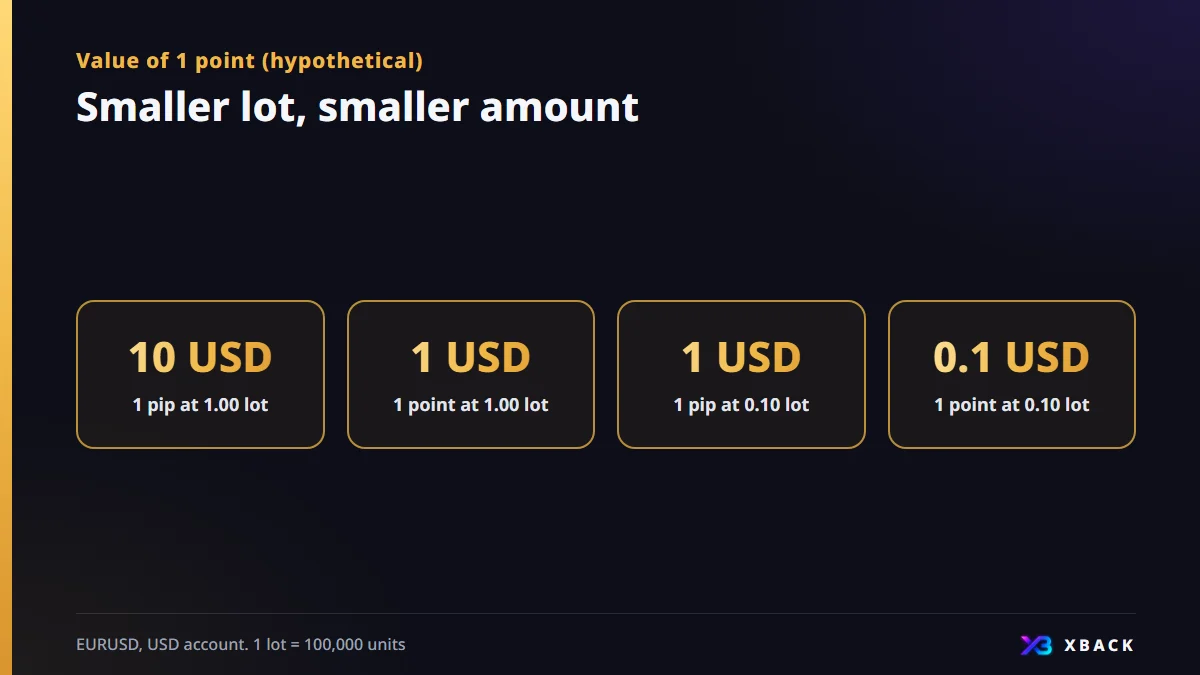
If you trade 1 lot (100,000 units) of EURUSD, 1 pip is 10 USD and 1 point is 1 USD. A smaller lot size scales the amounts down by the same ratio.
| Lot size | Units | 1 pip | 1 point |
|---|---|---|---|
| 1.00 lot | 100,000 units | 10 USD | 1 USD |
| 0.10 lot | 10,000 units | 1 USD | 0.1 USD |
| 0.01 lot | 1,000 units | 0.1 USD | 0.01 USD |
To work out the value of 1 pip, see the related column on pips and lots.
Where MT5 uses points
As far as we could confirm in the official MetaQuotes help, points appear in MT5 in the following places.
| Where | What involves points |
|---|---|
| "Specification..." in Market Watch | "Spread" is shown in points |
| "Stops level" in "Specification..." | The channel from the current price is shown in points |
| "Stops level" on the "Trade" tab in Settings | Choose "In Points" or "In Prices" |
| "Trailing Stop" on a position | The Stop Loss moves when the profit in points reaches the set level |
- 1
Right-click a symbol in Market Watch
Right-click the symbol you want to check to open the context menu.
- 2
Select "Specification..."
The symbol specification window opens.
- 3
Look at "Spread" and "Digits"
The spread is in points. "Digits" also shows how many decimal places the price has.
For "Stop Loss" and "Take Profit" in the order window, the official help says the platform settings decide whether you enter a price or a number of points. Check the selection on the "Trade" tab in Settings before you enter values.
Common input mistakes and how to avoid them
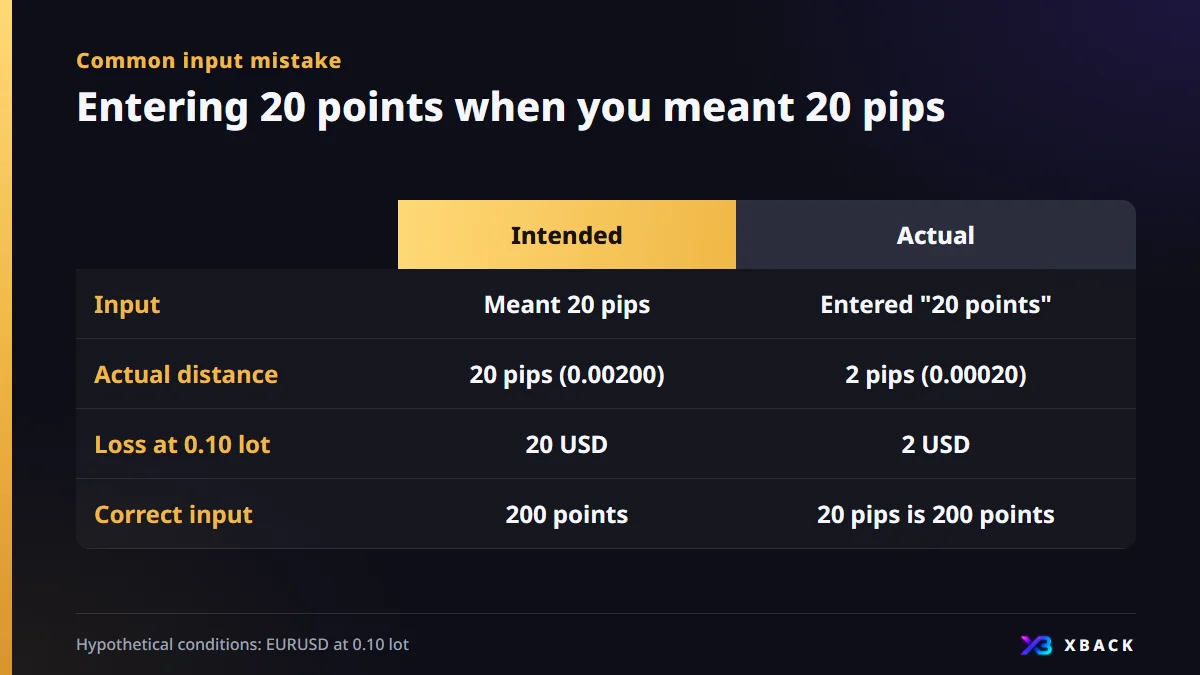
The classic mistake is typing 20 points when you meant 20 pips. For 0.10 lot of EURUSD, the difference works out as follows.
| Input | Actual distance | Loss at 0.10 lot |
|---|---|---|
| Meant 20 pips but entered "20 points" | 2 pips (0.00020) | 2 USD |
| 20 pips = "200 points" | 20 pips (0.00200) | 20 USD |
- With 20 points, the stop loss is only one tenth as wide, so a small move closes the trade
- Likewise, entering 200 points when you meant 200 pips makes the distance one tenth of what you intended
- Before you enter a value, write down "how many pips = how many points" by multiplying by 10
- After placing the order, check by eye the distance between the stop-loss line on the chart and the current price
- At first, use 0.01 lot to confirm that the input unit and the profit/loss amount match
Points for gold and stock index CFDs work differently
- Check "Digits" and "Tick size" in the symbol's "Specification..."
- Check "Tick value" for the amount when the price moves by one step
- The digits and tick size of XAUUSD may differ by broker
- For stock index CFDs too, the amount per point is set by the symbol's specification
- For the calculations, see the related columns on gold and stock index CFDs
Enter a currency pair and lot size to estimate the value of 1 pip in USD.
Calculate the value of 1 pipFAQ
Q.How many points is 1 pip?
On an account that quotes 5 decimal places (3 for yen pairs), 1 pip = 10 points. For EURUSD, 1 pip is 0.0001 and 1 point is 0.00001. On an account that quotes 4 decimal places (2 for yen pairs), 1 point is 1 pip.
Q.How many pips is a spread of 15 points in MT5?
It is 1.5 pips. In a symbol's "Specification..." in MT5, the spread is shown in points. Divide by 10 to get pips.
Q.In MT5, do I enter a stop loss in pips or points?
On the "Trade" tab in Settings, "Stops level" lets you choose "In Points" or "In Prices". When you specify points, 20 pips is 200 points. Check the setting before you enter values.
Q.How much is 1 point on EURUSD?
It is 1 USD at 1 lot (100,000 units) and 0.1 USD at 0.10 lot. 1 pip is 10 times that, so 10 USD at 1 lot.
Q.How many points is 1 pip of gold?
There is no single answer. For CFDs such as gold, the definition of a pip differs by broker and by person, so check "Digits" and "Tick size" in the symbol's "Specification...".
Sources
- MetaQuotes MT5 Help: Market Watch (Specification) (checked 2026-11-11)
- MetaQuotes MT5 Help: Performing deals (order window) (checked 2026-11-11)
- MetaQuotes MT5 Help: Platform settings (checked 2026-11-11)
- MetaQuotes MT5 Help: General concept of trading (Trailing Stop) (checked 2026-11-11)

This article is for information purposes only and is not investment advice. Conditions may change, so please check each broker's official page for the latest information. Offshore FX and CFD trading carries a risk of losses exceeding your principal.