Exness Withdrawal: Rules, Timing and Why You Can't Withdraw
Requested a withdrawal from Exness and it still hasn't arrived, or the request won't go through at all?
We checked the official Help Center (Japanese edition) on November 14, 2026. Processing time depends on the payment method, and your Personal Area (PA) shows both the average and the maximum time.
Below you'll find the withdrawal rules, the steps, the usual reasons a withdrawal fails, and how to follow up once the maximum time has passed.
Key takeaways
- An Exness withdrawal requires the payment method account name to match the name on your Exness account.
- Processing time differs by payment method, and the PA shows the average time and the expected maximum time.
- The withdrawal limit equals your free margin, and a request cannot be canceled after it is submitted.
In short: Exness withdrawals come down to a name match and each method's processing time
- The payment account must be in the same name as your Exness account. If the names don't match, the withdrawal won't go through
- Requesting a withdrawal to an unverified credit card without depositing from it first gets rejected
- Processing time varies by payment method. The PA shows the average time and the expected maximum
- You can withdraw up to the free margin of your trading account at any time
- Once submitted, a withdrawal request can't be canceled
- If the maximum time has passed, filter your transaction history to withdrawals only and contact support from that withdrawal
Basic rules for Exness withdrawals
| Item | What the official source says |
|---|---|
| Name | The payment account must be registered under your legal name and match the name on your Exness account |
| Limit | You can withdraw up to the free margin of your trading account at any time |
| Frequency | No daily limit on the number of withdrawals, but each payment method has its own minimum and maximum |
- Available withdrawal methods depend on your registered region and verification status. The withdrawal section of the PA shows what you can use right now
- Double-check the account number and other details to avoid delays
- You must withdraw in the same currency you chose when depositing (per the deposit rules)
- Exness states that withdrawals must follow its payment method priority rule
Minimum deposits and deposit rules are covered in Exness minimum deposit and fees. This article sticks to withdrawals.
How to withdraw from Exness (PA and app)
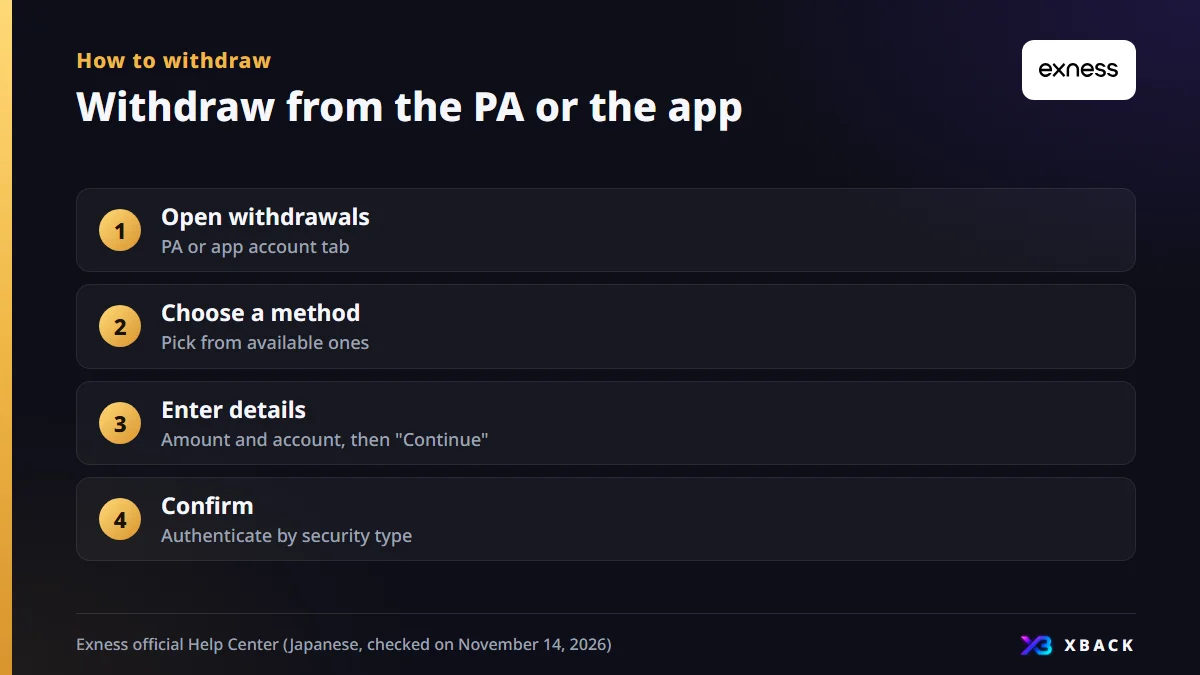
- 1
Open the withdrawal section
Go to Withdrawal in the PA, or tap Withdrawal in the account tab of the app.
- 2
Pick a payment method
Choose one of the methods available to you.
- 3
Enter the amount and account
Enter the amount and the trading account, then tap Continue.
- 4
Confirm and verify
Tap Confirm and verify with your current security type (code, push notification, authenticator app and so on).
Once done, you'll see a confirmation message and the funds are sent to the payment account you chose. If you're redirected to the payment provider's site, finish the transaction there.
How long does an Exness withdrawal take? What to do when it's late
- Processing time: the PA shows an average and an expected maximum. Most requests finish within the average, but some take up to the maximum
- Weekends and holidays: you can still deposit and withdraw, but anything that needs verification may be delayed because it isn't a business day
- Fees: Exness itself charges nothing, but your payment provider or bank may. Any processor fee is shown in the payment method details in the PA
- Limits: the PA shows the minimum and maximum for each method
If the maximum time has passed and the funds still haven't arrived, check and follow up in this order.
- 1
Open your transaction history
Go to the transaction history in the PA.
- 2
Filter to withdrawals only
Show only withdrawal transactions.
- 3
Open the withdrawal
Open the transaction to see its details.
- 4
Send a support request
If it's past the maximum time, send a support request from the transaction history.
Exness reserves the right to change processing times. Check the time shown for your chosen method in the PA before you submit.
Main reasons you can't withdraw from Exness, and what to do
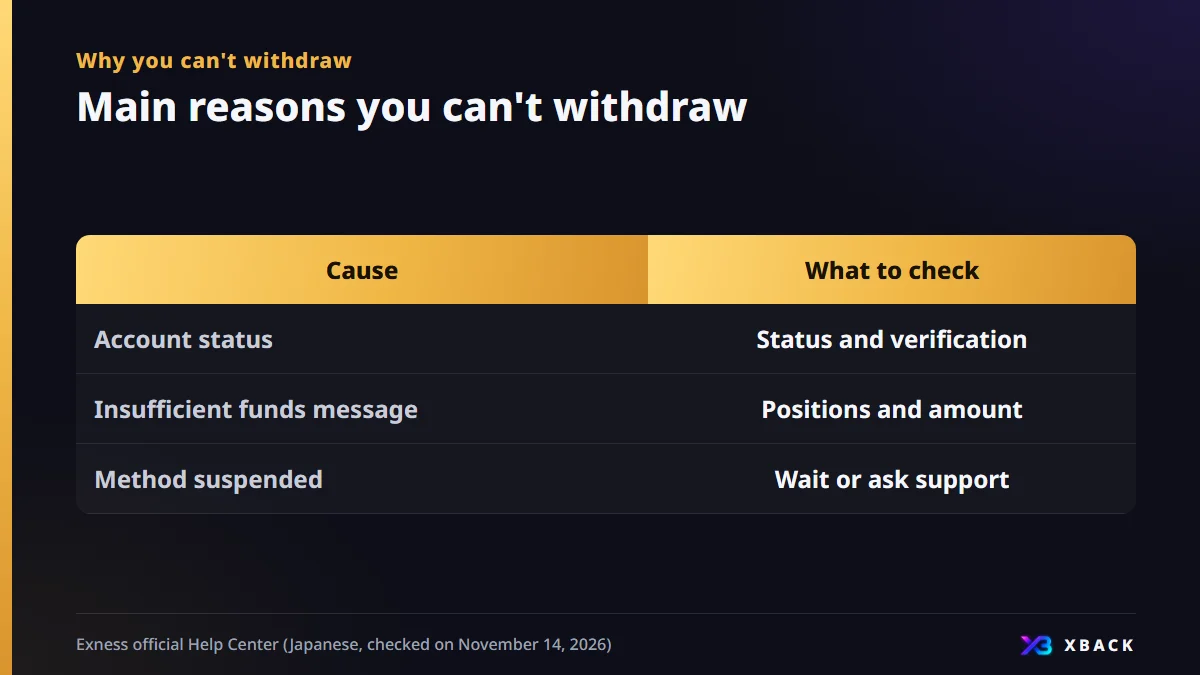
| Cause | What the official source says | What to check |
|---|---|---|
| Account status | Deposits and withdrawals are restricted for archived or deactivated accounts, or when verification is incomplete | Account status and verification |
| Insufficient funds error | The help lists open positions, the selected account and the currency conversion rate as things to check | Open positions and amount |
| Payment method unavailable | A method can be temporarily unavailable, for example during maintenance | Wait for it to return or contact support |
- A name mismatch blocks the withdrawal
- An unverified credit card is rejected unless you deposited from it first. You'll be asked to verify the card before withdrawing
- If your profile isn't fully verified, a payment method can appear locked
- If you urgently need a method that isn't available, Exness recommends opening a ticket from your transaction history
For withdrawal refusals in general, at any broker, see Why overseas FX withdrawals get refused.
Withdrawing from an account with no trading activity
- The withdrawal rules don't define what counts as an account with no trading activity
- Archiving accounts unused for 3 days is a separate mechanism. Funds stay in an archived account
- If you're not sure whether this applies to you, ask Exness support before withdrawing
- For dormant accounts in general, see Dormant accounts and inactivity fees in overseas FX
Exness pre-withdrawal checklist
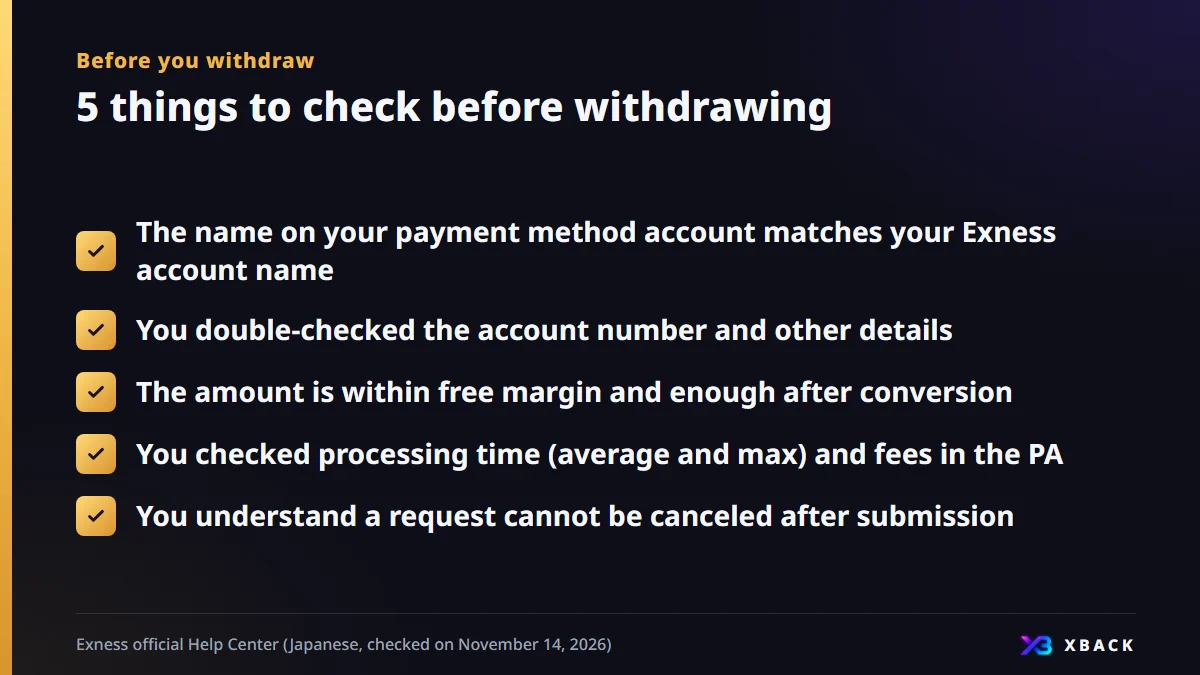
- The name on your payment account matches the name on your Exness account
- You double-checked the account number and other details
- The amount is within your free margin, even after currency conversion
- You checked the processing time (average and maximum) and fees in the PA
- You understand the request can't be canceled once submitted
Your available withdrawal methods depend on verification status, so it pays to finish verification first. See Identity verification for overseas FX for the steps.
See deposit and withdrawal methods and what to watch for. Accounts opened through XB receive cashback in the trading account every day.
View the Exness deposit and withdrawal pageFAQ
Q.How long does an Exness withdrawal take to arrive?
It depends on the payment method. The PA shows an average and an expected maximum time. Most requests finish within the average, but some take up to the maximum.
Q.What should I do if my Exness withdrawal is past the maximum time?
Filter your PA transaction history to withdrawals only and open the transaction to see its details. If it's past the maximum time, send a support request from the transaction history.
Q.Why can't I withdraw from Exness?
Reasons Exness lists include a name mismatch, an unverified card you haven't deposited from, an archived or deactivated account, incomplete verification, insufficient funds and an unavailable payment method.
Q.Is there a limit on how much I can withdraw from Exness?
You can withdraw up to the free margin of your trading account at any time. There's no daily limit on the number of withdrawals, but each method's minimum and maximum are shown in the PA.
Q.Can I cancel an Exness withdrawal request?
No. The official help says a request can't be canceled once submitted, so double-check the name, account number and other details before you confirm.
Sources
- Exness Help Center "General withdrawal rules" (checked 2026-11-14)
- Exness Help Center "How to withdraw from a trading account" (checked 2026-11-14)
- Exness Help Center "Exness Trade (app): Withdrawals" (checked 2026-11-14)
- Exness Help Center "Why hasn't my withdrawal been reflected?" (checked 2026-11-14)
- Exness Help Center "Does Exness charge payment fees?" (checked 2026-11-14)
- Exness Help Center "Payment method fees, processing times and limits" (checked 2026-11-14)
- Exness Help Center "Available payment methods" (checked 2026-11-14)
- Exness Help Center "Why a trading account is unavailable for deposits/withdrawals" (checked 2026-11-14)
- Exness Help Center "The 'Insufficient funds' error" (checked 2026-11-14)
- Exness Help Center "When a payment method is unavailable" (checked 2026-11-14)
- Exness Help Center "Account verification" (checked 2026-11-14)
- Exness Help Center "Can I deposit or withdraw outside business hours?" (checked 2026-11-14)
- Exness Help Center "Canceling a withdrawal request" (checked 2026-11-14)
- Exness Help Center "General deposit rules" (checked 2026-11-14)

This article is for information purposes only and is not investment advice. Conditions may change, so please check each broker's official page for the latest information. Offshore FX and CFD trading carries a risk of losses exceeding your principal.