Bid and Ask in Forex Explained: Buy vs Sell Price, Spread and How to Read the Chart
Have you ever opened a trade and wondered why it shows a loss right away?
In short, buys fill at the Ask (the higher price) and sells fill at the Bid (the lower price), so a new trade starts in the red by the spread, the gap between the two.
This article covers what Bid and Ask mean, how they relate to the spread, how to display them in MT5, and which price each order type uses.
Key takeaways
- Buys fill at the Ask (the higher price) and sells fill at the Bid (the lower price), and the gap is the spread.
- With a Bid of 1.08500 and an Ask of 1.08510, a new buy starts at -1.0 pips, a floating loss of -10 USD for 1.0 lot.
- The MT5 chart is Bid-based, and stop-loss triggers on the Bid for buy positions and on the Ask for sell positions.
In short: buys fill at the Ask, sells at the Bid, and the gap is the spread
- The Bid is the price you can sell at and the Ask is the price you can buy at, and the Ask is always higher
- The gap between Ask and Bid is the spread, so a new trade starts with a floating loss of that amount
- The MT5 chart shows the Bid by default, so your buy fill price sits above the line
- Stop-loss and take-profit trigger on the Bid for buy positions and on the Ask for sell positions
What Bid and Ask mean: which price you trade at
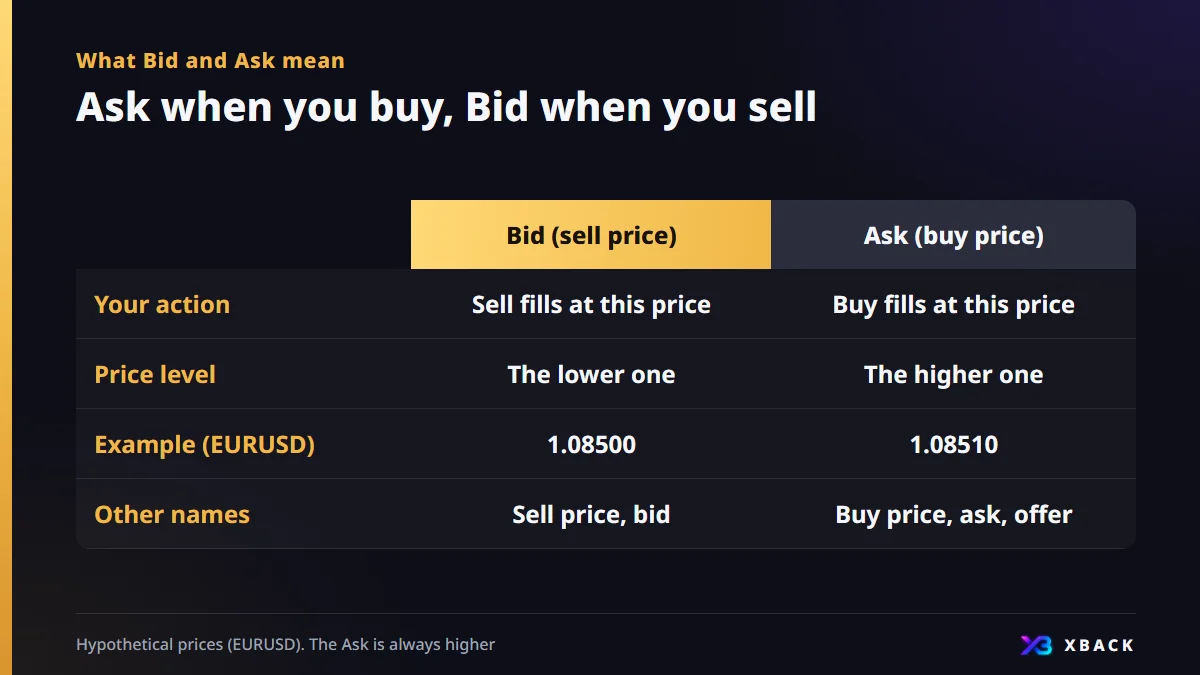
Forex always shows two prices at once. The Bid is the price the broker buys at (the price you can sell at), and the Ask is the price the broker sells at (the price you can buy at).
| Bid (sell price) | Ask (buy price) | |
|---|---|---|
| Your action | A sell order fills at this price | A buy order fills at this price |
| Price level | The lower one | The higher one |
| Example quote (EURUSD) | 1.08500 | 1.08510 |
| Other names | Sell price, bid | Buy price, ask, offer |
Words like "buy price" and "sell price" flip meaning depending on whose side they are viewed from. If you remember Ask for when you buy and Bid for when you sell, you will not get confused.
On the MT5 order window, the sell button shows the Bid and the buy button shows the Ask. The price on the button tells you which price you will fill at.
How it relates to the spread: why a new trade starts in a loss
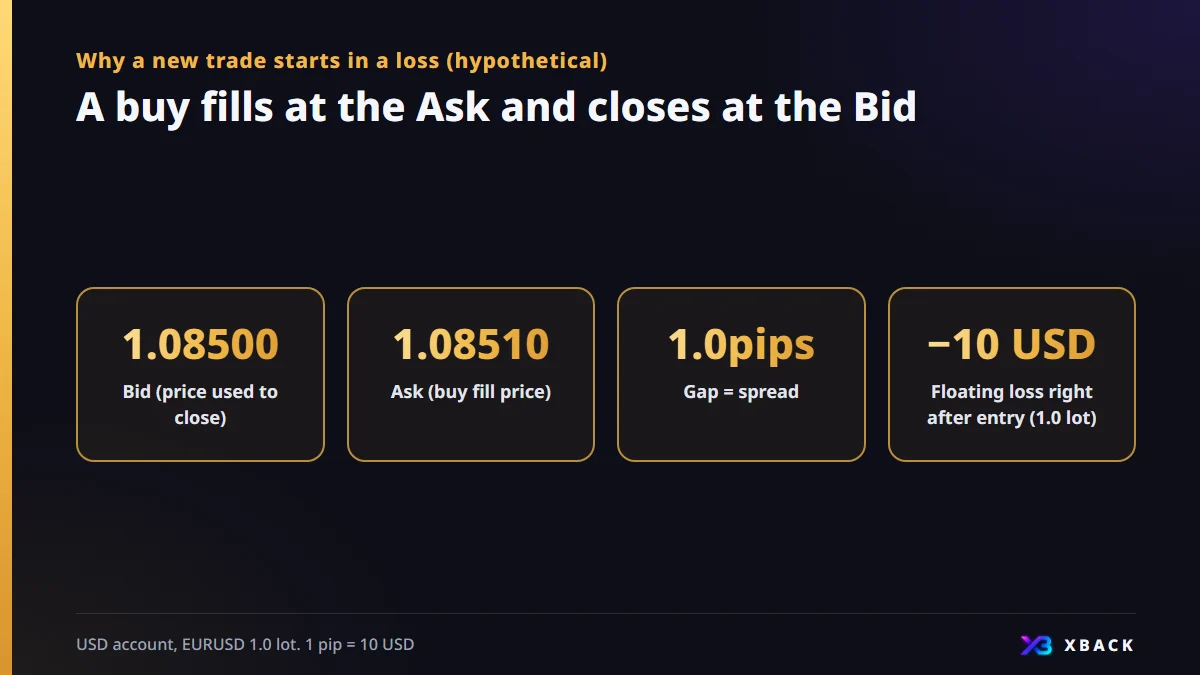
When the Bid is 1.08500 and the Ask is 1.08510, the gap of 0.00010 is the spread, or 1.0 pips. Take 1.0 lot of EURUSD in a USD account.
- New buy: fills at the Ask of 1.08510. You close at the Bid, so profit and loss stay below zero until the Bid rises to 1.08510
- Floating loss right after the fill: closing at the Bid of 1.08500 gives -1.0 pips. At 1 pip = 10 USD for 1.0 lot, that is -10 USD
- New sell: fills at the Bid of 1.08500. You close at the Ask, so profit and loss stay below zero until the Ask falls to 1.08500
- If the spread widens to 2.0 pips, the same lot size starts with a floating loss of -20 USD
A loss right after entry is not something the broker deducts on its own. It is simply the gap between the buying price and the selling price. The narrower the spread, the smaller this loss.
The spread is not always constant, and it widens in the early morning and around data releases. You can check when it tends to widen in the related column.
The MT5 chart is Bid-based: how to show the Ask line
By default, MT5 candles are drawn with the Bid price. That is why your buy fill price appears slightly above the line on the chart.
- 1
Right-click on the chart
Right-click on the chart where you want the Ask price drawn as a line.
- 2
Choose "Properties"
Choose "Properties" (F8) from the menu to open the chart settings.
- 3
Tick "Show Ask line" on the Show tab
On the "Show" tab, tick "Show Ask line" and click "OK".
- 4
Check the two lines
The Ask line appears above the Bid line. The gap between the two lines is the current spread.
When you think about a buy order, looking at the Ask line shows the price you will actually fill at. When the spread widens, the gap between the two lines opens enough to see.
Which price triggers limit, stop and stop-loss orders
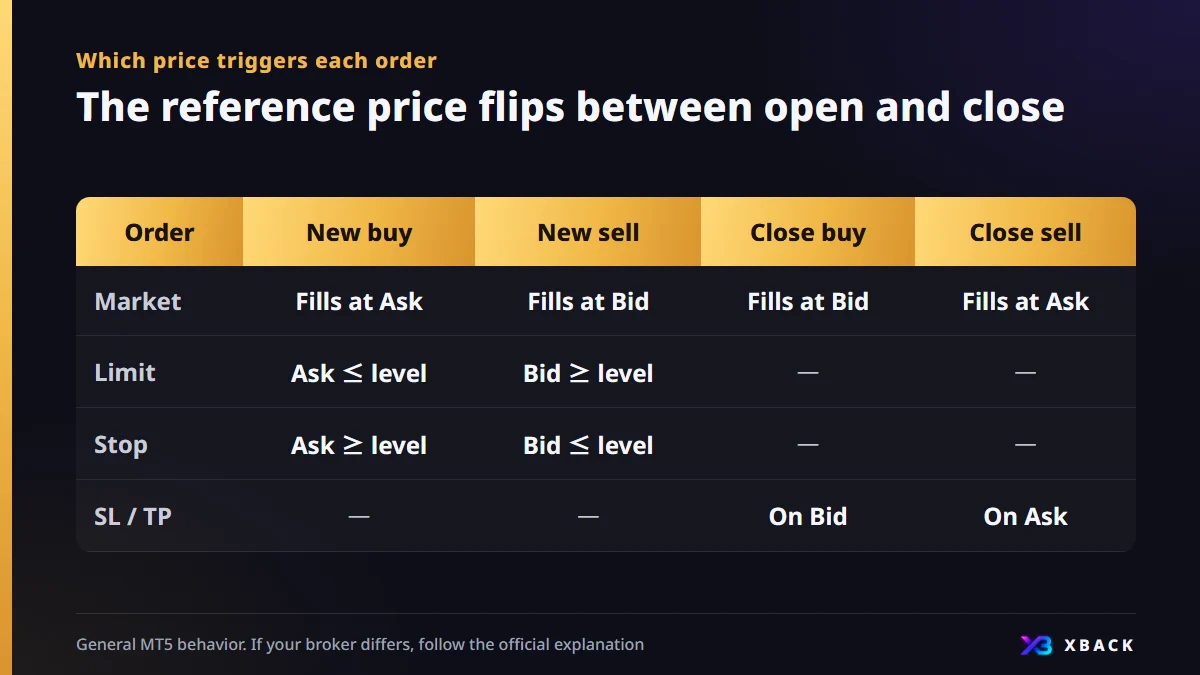
Each order type is triggered by either the Bid or the Ask. A new buy uses the Ask and closing a buy uses the Bid, so the reference price switches between opening and closing.
| Order | New buy | New sell | Closing a buy position | Closing a sell position |
|---|---|---|---|---|
| Market | Fills at the Ask | Fills at the Bid | Fills at the Bid | Fills at the Ask |
| Limit | Triggers when the Ask is at or below the set price | Triggers when the Bid is at or above the set price | ― | ― |
| Stop | Triggers when the Ask is at or above the set price | Triggers when the Bid is at or below the set price | ― | ― |
| Stop-loss (SL) / take-profit (TP) | ― | ― | Triggers when the Bid reaches the set price | Triggers when the Ask reaches the set price |
The stop-loss on a buy position triggers on the Bid. It fires when the chart (Bid) touches the stop-loss price, so it matches what you see.
The stop-loss on a sell position, on the other hand, triggers on the Ask. Note that it can fire when the Ask reaches it even if the Bid on the chart has not.
Bid, Ask and cashback
- The spread is a cost you pay on every trade, and cashback is a way to win back part of it
- Monaxa's Standard account returns 5 USD per lot (round turn) on FX. With a 1.0-pip spread (10 USD), your net cost is 5 USD
- Exness's Pro account returns 15.3% of the spread you pay. On a 10 USD spread, that is 1.53 USD back
- Even with a rebate, it is not a reason to trade more during times when the spread widens
Enter the spread and lot size to see the cost of one trade in USD. Check in numbers how large the floating loss right after entry will be.
Calculate your spread costFAQ
Q.In forex, is the Bid or the Ask the buy price?
The price you pay when you buy is the Ask. The Bid is the price when you sell, and the Ask is always higher. Words like "buy price" and "sell price" flip depending on whose view they come from, so it is safer to remember Bid and Ask.
Q.Why does a trade show a loss right after I open it?
A buy fills at the Ask and is closed at the Bid. With a Bid of 1.08500 and an Ask of 1.08510, closing right after buying at the Bid gives -1.0 pips, or -10 USD for 1.0 lot. That is the spread, not something the broker deducts on its own.
Q.How do I show the Ask line on an MT5 chart?
Right-click the chart, choose "Properties" (F8), and tick "Show Ask line" on the "Show" tab. The Ask line appears above the Bid line, and the gap between them is the current spread.
Q.Which price triggers the stop-loss on a sell position?
It triggers on the Ask. The chart is drawn with the Bid, so even if the price you see has not reached the stop-loss, it can fire once the Ask does after the spread widens. The stop-loss on a buy position triggers on the Bid.

This article is for information purposes only and is not investment advice. Conditions may change, so please check each broker's official page for the latest information. Offshore FX and CFD trading carries a risk of losses exceeding your principal.