DecodeFX Account Opening: Sign-Up, ID Check and Trading Account
Not sure where to start with a DecodeFX account, or what documents you need?
The short answer: you can start with just an email address and a password. We checked the official sign-up screen on November 16, 2026. You pick and activate an account type in the Client Portal after registering.
By the end of this guide you'll know the order of steps from sign-up to your first trade, and which documents to have ready for verification.
Key takeaways
- DecodeFX account opening goes through registration, ID verification and activating an account type.
- The first fields on the sign-up screen are email and password. Opening is free, and the minimum deposit is 100 USD for STD and PRO and 1 USD for CENT.
- Identity verification is described as submitting government-issued photo ID. An STD account opened through XB earns back 18 USD per round-turn EURUSD lot.
In short: DecodeFX account opening goes through registration, ID verification and activating an account type
- The flow: sign up → verify your ID → deposit → activate an account type in the Client Portal → trade
- The first fields on the sign-up screen are email, password and password confirmation (checked November 16, 2026)
- You can also sign up with a Google account or an Apple Account
- Opening an account is free. The minimum deposit is 100 USD for STD and PRO, and 1 USD for CENT
- For verification, DecodeFX asks for a government-issued photo ID
DecodeFX account opening steps: 5 steps from sign-up to trading
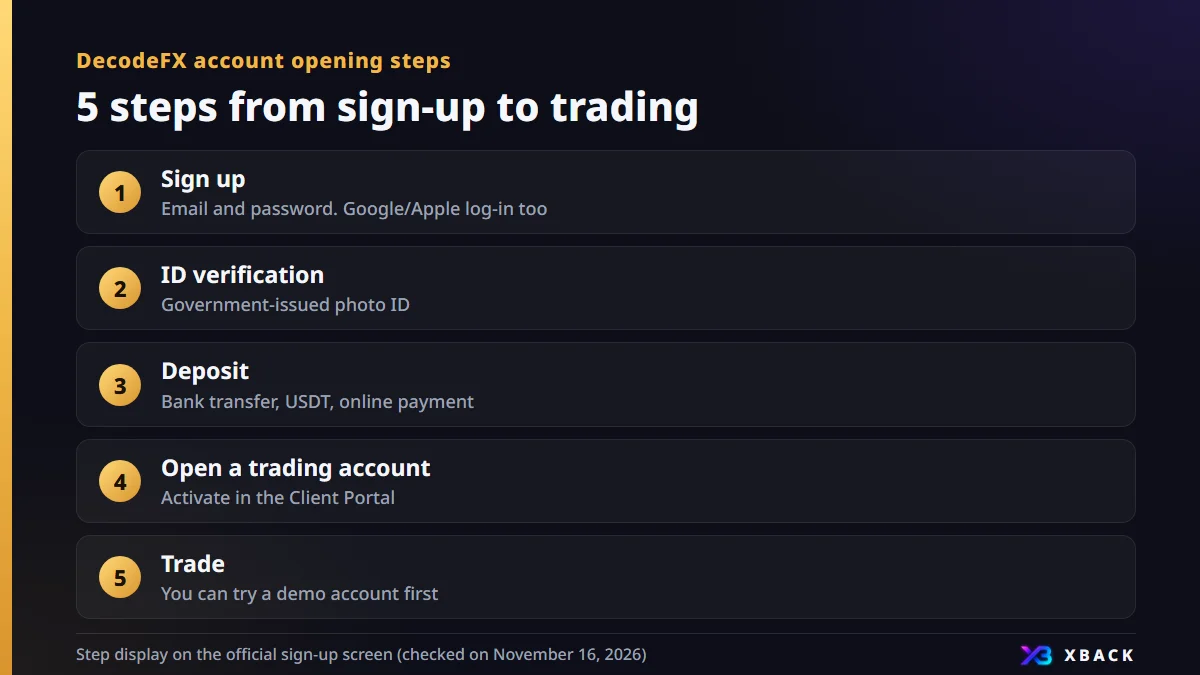
The five stages below follow the progress bar shown at the top of the sign-up screen.
- 1
Sign up
Register with email and password. Google and Apple log-in are also available.
- 2
ID verification
Submit a government-issued photo ID.
- 3
Deposit
Fund by bank transfer, USDT or an online payment service.
- 4
Open a trading account
Activate the account type you want in the Client Portal.
- 5
Trade
You can try a demo account first if you prefer.
Each description combines DecodeFX's Japanese pages and its English FAQ. Screens can change, so go with what you see on screen.
Fields on the DecodeFX sign-up screen
We viewed the sign-up screen without submitting it. The guide page and the English FAQ describe the fields differently from the live form.
| Where we checked | Fields |
|---|---|
| Live sign-up screen (Japanese) | Email, password and password confirmation. Google account or Apple Account log-in also available |
| English FAQ (English (India)) | Name, account type, country of residence, email, phone number and password |
| Japanese guide page | Register with email and phone number; the support team then verifies it |
The live form's first step had no fields for name, country, account type or phone number. As the Japanese FAQ explains, you choose the account type later in the Client Portal.
Documents needed for DecodeFX ID verification
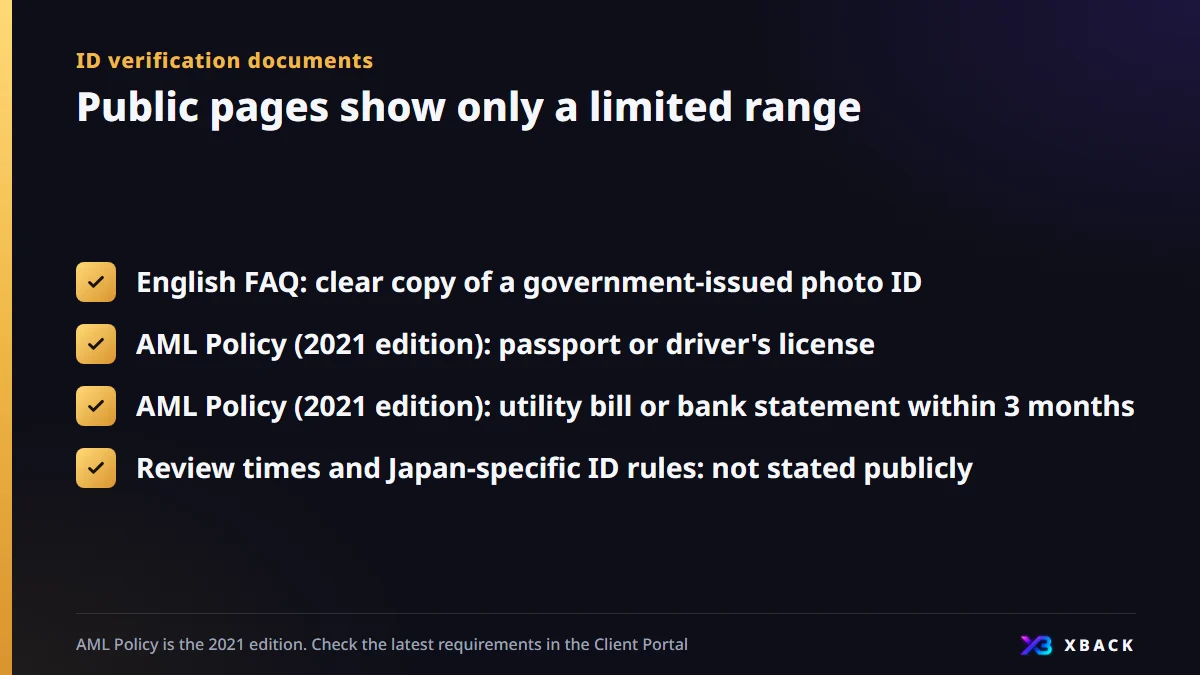
DecodeFX's public pages don't publish a document list (checked November 16, 2026). Here is what the English FAQ and the 2021 AML Policy mention.
- English FAQ: a clear copy of a government-issued photo ID
- AML Policy (2021 edition): a passport or driver's license
- AML Policy (2021 edition): a utility bill or bank statement from the last 3 months
- Review times and any Japan-specific ID rules are not stated on the public pages
DecodeFX trading account types and minimum deposits
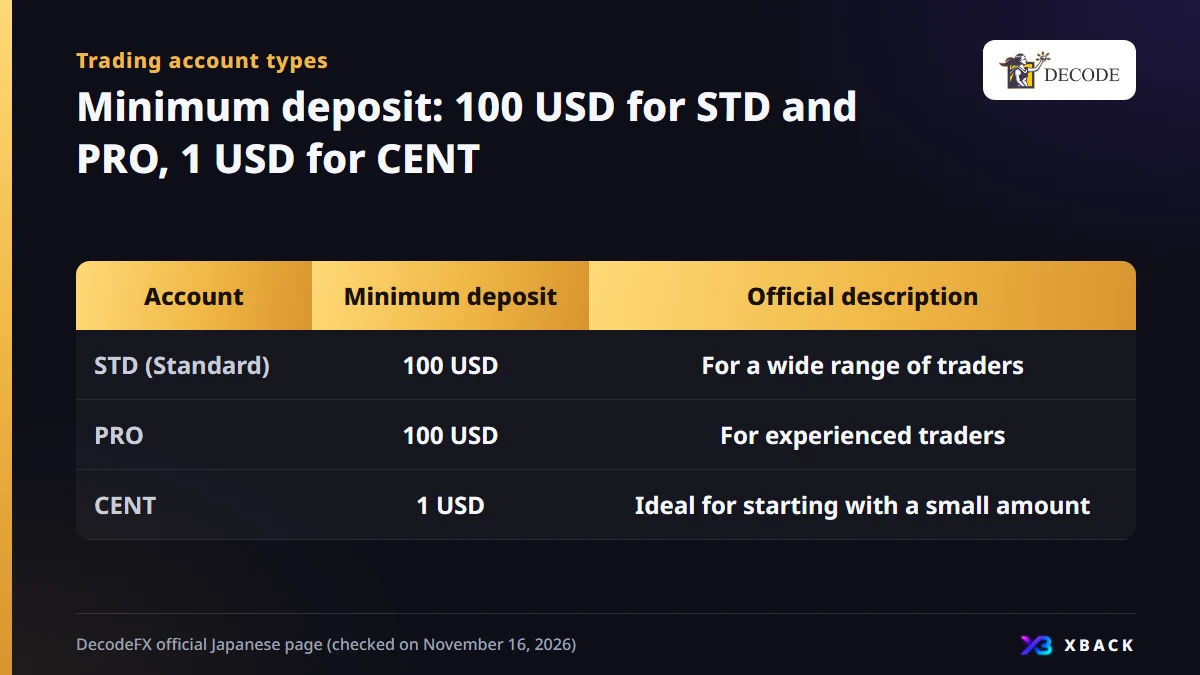
| Account | Minimum deposit | Official description |
|---|---|---|
| STD (Standard) | 100 USD | For a wide range of traders |
| PRO | 100 USD | For experienced traders |
| CENT | 1 USD | Ideal for starting with a small amount |
If you can't decide, STD has no commission and CENT lets you start from 1 USD. For spreads and commissions side by side, see our DecodeFX account types comparison.
Points to check before opening, and XB cashback
- Opening an account is free. DecodeFX says your only costs are the spread and, on some accounts, a commission
- Be careful if family members share a computer or connection. The terms (T&C 9.7 p and q, 2021 edition) list trading multiple accounts from the same IP address or device as grounds for voiding trades or closing accounts
- Deposits must come from a bank account in your own name, matching the application (PDS 4.1, 2021 edition)
- DecodeFX does not open accounts for residents of the United States, Australia, Canada or North Korea
XB's cashback started on November 18, 2026. Open an STD account through the XB link and every round-turn lot of EUR/USD returns 18 USD to your trading account. Amounts for each account are in DecodeFX cashback.
If you already have a DecodeFX account, you can ask DecodeFX support to re-link it to XB, and it may be accepted. Opening a new account through the XB link is the sure route.
How to open through XB, plus rebate amounts, on the DecodeFX broker page.
See the DecodeFX account opening pageFAQ
Q.What do I need to open a DecodeFX account?
You can start with an email address and a password. For verification, the English FAQ asks for a government-issued photo ID. The 2021 AML Policy also lists a utility bill or bank statement from the last 3 months.
Q.Does it cost anything to open a DecodeFX account?
No. DecodeFX's Japanese page says opening an account is free, and trading costs are limited to the spread and, on some accounts, a commission (checked November 16, 2026).
Q.Can I sign up to DecodeFX with a Google account?
Yes. The sign-up screen we checked on November 16, 2026 offered Google and Apple Account log-in alongside email and password.
Q.What is the DecodeFX minimum deposit?
100 USD for STD and PRO, and 1 USD for CENT, per the official Japanese page. Listed funding methods are bank transfer, USDT and various online payment services.
Q.Do I get cashback if I open DecodeFX via XB?
Yes. Accounts opened through the XB link are eligible, and cashback is credited to your trading account automatically: 18 USD per round-turn lot of EUR/USD on STD. For an existing account, you can ask DecodeFX support for a re-link to XB.
Sources
- DecodeFX official page "Trading Accounts" (Japanese) (checked 2026-11-16)
- DecodeFX official page "Trading Accounts" (English (India)) (checked 2026-11-16)
- DecodeFX sign-up screen (Japanese) (checked 2026-11-16)
- DecodeFX official page "FAQ" (English (India)) (checked 2026-11-14)
- Decode Global Limited Terms and Conditions (dated June 21, 2021, English) (checked 2026-11-16)
- Decode Global Limited Product Disclosure Statement (dated June 21, 2021, English) (checked 2026-11-16)
- Decode Global Limited AML/CTF Policy (2021 edition, English) (checked 2026-11-14)

This article is for information purposes only and is not investment advice. Conditions may change, so please check each broker's official page for the latest information. Offshore FX and CFD trading carries a risk of losses exceeding your principal.