Axi Swap-Free Account: How to Apply and Holding Fee Terms
Wondering whether Axi's swap-free account is really free, and whether you can get one where you live?
It is not free. No swap is charged, but Axi applies an overnight holding fee instead, and it does not publish a list of eligible countries. We checked Axi's account pages, help center and fee table on November 16, 2026.
Below we cover which symbols are swap-free, how the holding fee works, how to apply and what to watch out for. Where Axi's pages word things differently, we show both.
Key takeaways
- Axi's swap-free account has no swap but applies an overnight holding fee instead.
- The Japanese page mentions it, but the official pages do not state whether residents of Japan are eligible, and we could not confirm it.
- To apply, choose the account type "Swap-free" in the Client Portal.
Summary: Axi's swap-free account charges a holding fee, and availability depends on your country
- The Japanese account page lists a "swap-free trading account", but the detail page itself is still in English
- No swap (an interest-based cost) is charged, but Axi says it applies an "overnight holding fee" instead. The account is not completely free
- The Japanese help article says the fee applies after a "grace period of 5 business days", while the English fee table says "5 consecutive days or more". The two wordings differ
- Axi does not list eligible countries. If your country is not eligible, the "swap-free" option simply does not appear when you open an account
- To apply, choose the account type "Swap-free" in the Client Portal. If the option is not shown, ask Customer Success
- The Japanese help article says a swap-free account cannot be held at the same time as a Standard or Pro account. The additional-account article does not mention whether they can coexist
Basic terms of Axi's swap-free (Islamic) account
A swap-free account is also called an Islamic account. Axi describes it as being for people who cannot receive or pay interest for religious reasons.
- Position: one of the account types you choose when opening an account. The account card reads "Swap-free / Interest-free, ideal for Islamic traders"
- Spread: 0.68 pips on EURUSD. The trading commission field shows "-", the same as Standard
- Recommended minimum deposit: $100
- Maximum leverage: up to 1000:1 (as shown on the account page)
- Account currencies: AUD, CAD, CHF, EUR, GBP, HKD, JPY, NZD, PLN, SGD, USD
Being listed on an account page does not mean you can choose it. Axi's help center says only that it "may be offered depending on your country of residence and specific regulatory requirements", with no list of countries.
For how it compares with Standard, Premium and Elite, see Axi account types compared.
Symbols exempt from swap and products that are not
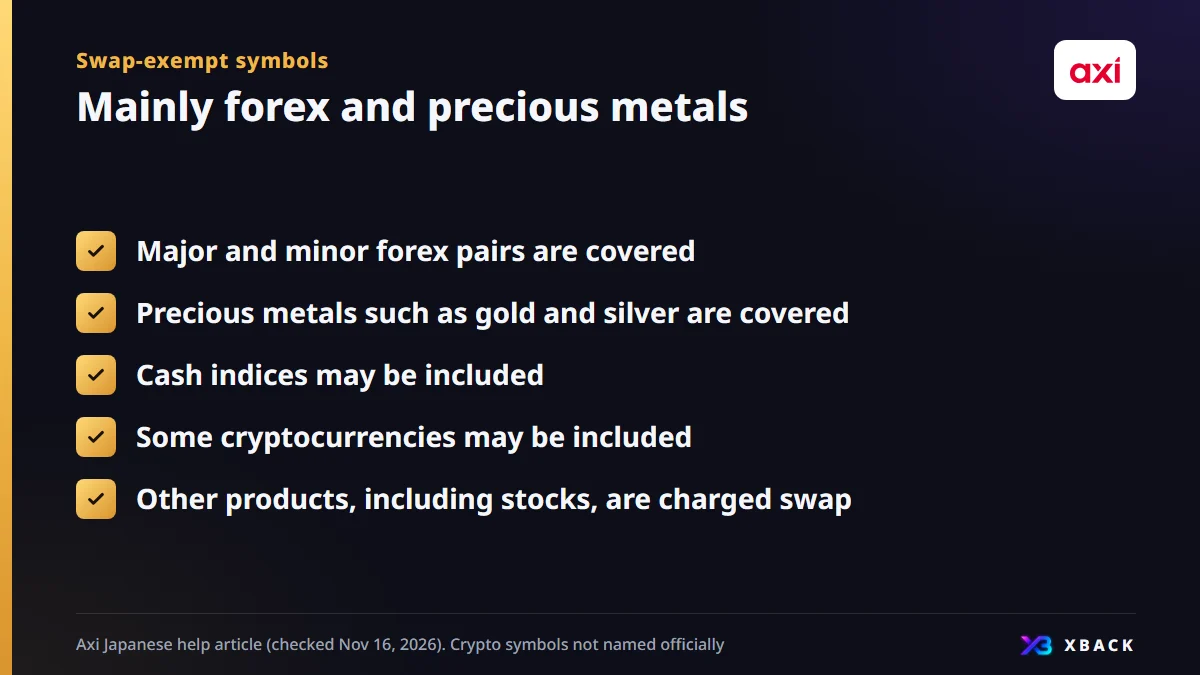
The Japanese help article describes the products that are not charged swap fees as follows.
- Major and minor forex currency pairs are covered
- Precious metals such as gold and silver are covered
- Cash indices may be included
- Some cryptocurrencies may be included (no symbol names given)
- Other products, including stocks, are charged swap
The Japanese fee page and the English Product Schedule describe the scope as "forex, spot precious metals and cash CFDs". Cryptocurrencies and stocks are mentioned only in the help article.
Overnight holding fee terms and example amounts
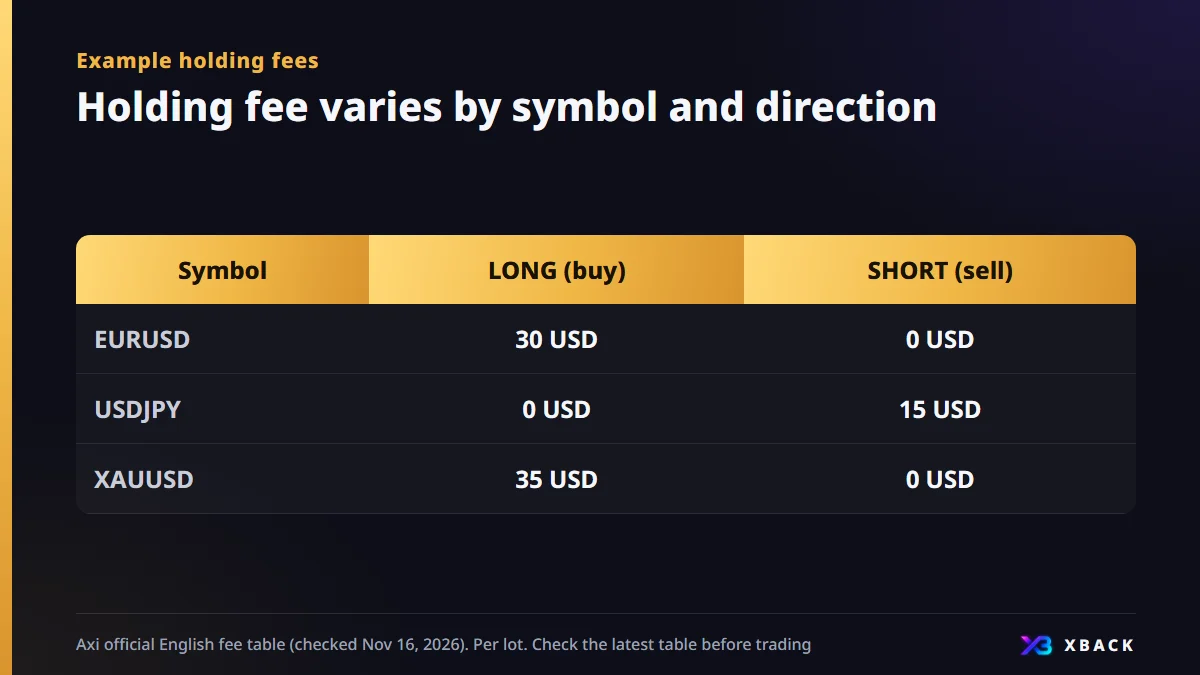
The Japanese fee page says no overnight finance fee is charged on this account. Instead an overnight holding fee applies, described as a fixed charge that is not based on interest rates.
- Japanese help article: holding a swap-free symbol "beyond a grace period of 5 business days" incurs a new holding fee. It says "from April 15" but gives no year
- English fee table: forex majors and minors and precious metals with the ".swf" suffix are covered. Holding "5 consecutive days or more" incurs the fee, which accrues every day at 17:00 New York time
The official wording alone does not settle how the days are counted, for example business days versus consecutive days. The Japanese fee page gives neither amounts nor number of days.
| Symbol | LONG (buy) | SHORT (sell) |
|---|---|---|
| EURUSD | 30 USD | 0 USD |
| USDJPY | 0 USD | 15 USD |
| XAUUSD | 35 USD | 0 USD |
The amounts are per lot. The fee table says the charge accrues every day at 17:00 New York time, so two lots would cost twice as much on the same day.
The table's wording does not settle from which day, or for how many days, you are charged. Some symbols are free in one direction, so check the amount for the side you hold.
How to apply for an Axi swap-free account
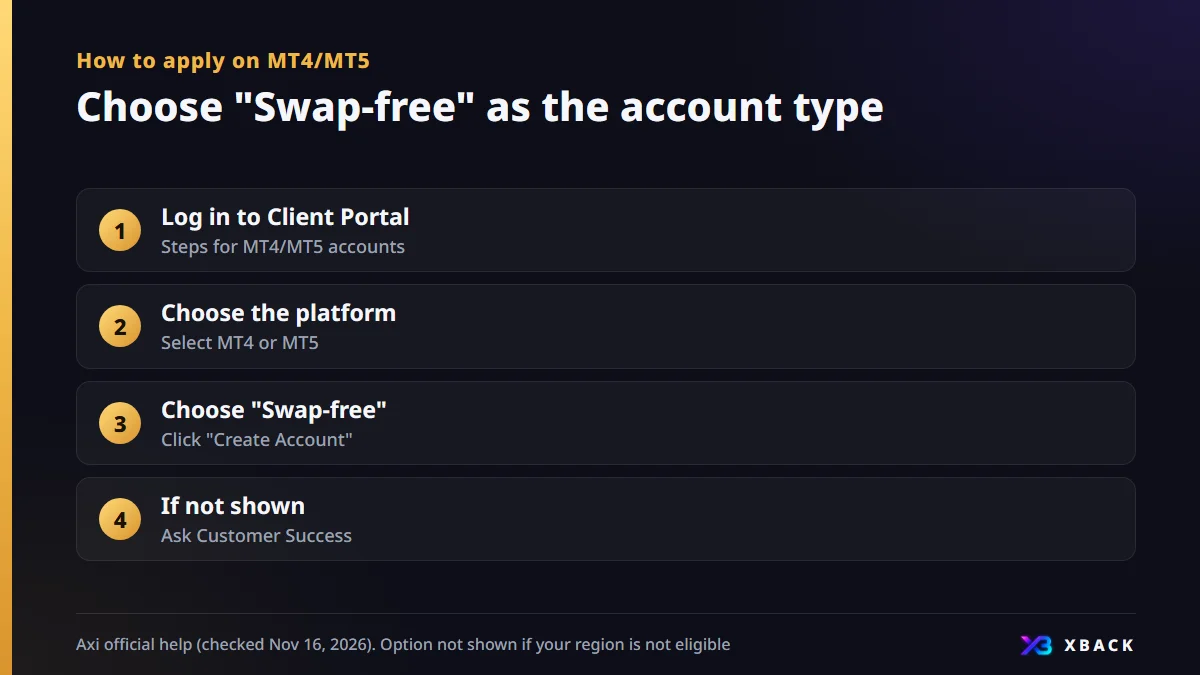
The official help article says that if you live in an eligible region, you can also choose it during account-opening onboarding. The steps for creating an MT4 or MT5 account are as follows.
- 1
Log in to the Client Portal
Steps for creating an MT4 or MT5 account
- 2
Choose the trading platform
Select MT4 or MT5
- 3
Choose "Swap-free" as the account type
Click "Create Account" to create it
- 4
If the option is not shown
Ask Customer Success to process the request
- Additional account: from "Create a New Account", choose "Add New Account", then select MT4 or MT5
- Once your main account is set up or opened as swap-free, every additional account you open afterwards is automatically swap-free
- Axi trading platform (app): only for customers in eligible regions, and you cannot apply manually. Only one swap-free account is allowed
- Once approved, a trade notice is issued describing the interest-free nature of the account and its general terms (Japanese help article)
Before you apply, and cashback
- Holding at the same time (Japanese help article): a swap-free account cannot be held together with a Standard or Pro account. If you already have an account, close your positions and close the current account before opening one
- Additional accounts (another help article): it explains how to open an additional account, and if the main account is swap-free the additional account automatically becomes the same. It does not say whether it can coexist with a Standard or Pro account
- Measures against abuse: the Product Schedule (AxiTrader LLC, effective October 6, 2026) reserves the right to revoke eligibility for accounts it considers to be used abusively, for suspicious trading or in a way that lacks good faith
- Monitoring: the Japanese help article says Axi has the right to monitor whether the account is used for its intended purpose, and will contact you directly if fraud is suspected
- Before opening, ask official support about the holding fee days and amounts, and whether residents of your country are eligible
We limit our description of the religious reasons to what the official pages say. For individual decisions, please ask official support or a specialist.
XB has not opened cashback sign-ups for Axi yet. We will post the amount on the broker page when they open. Axi's help center notes that some account types may not qualify for the full rebate, without naming them.
Check Axi's account conditions and when cashback sign-ups open.
See Axi detailsFAQ
Q.Who can open an Axi swap-free account?
Axi does not publish a list of eligible countries. Its help center says that if your country is not eligible, the "swap-free" option does not appear when you open an account. Check whether the option shows up in your Client Portal.
Q.Is the Axi swap-free account completely free?
No swap is charged, but it is not completely free. Axi says it applies a fixed overnight holding fee that is not interest-based. Check the fee table for the number of days and the amounts.
Q.How do I apply for an Axi swap-free account?
For MT4 and MT5, choose the account type "Swap-free" in the Client Portal and click "Create Account". If the option is not shown, ask Customer Success. You cannot apply manually in the app.
Q.Which symbols does the Axi swap-free account cover?
According to the Japanese help article, forex major and minor currency pairs and precious metals such as gold and silver are covered. Cash indices and some cryptocurrencies may be included. Swap applies to other products, including stocks.
Q.Can I hold an Axi swap-free account together with a Standard account?
The Japanese help article says they cannot be held at the same time. Another help article only says that if the main account is swap-free, additional accounts automatically become swap-free, and does not say whether they can coexist. If in doubt, ask Customer Success before opening.
Sources
- Axi official page "Account types" (Japanese) (checked 2026-11-16)
- Axi official page "Swap-free account" (Japanese) (checked 2026-11-16)
- Axi official page "Islamic account" (English) (checked 2026-11-16)
- Axi official page "Fees and charges" (Japanese) (checked 2026-11-16)
- Axi official "Swap-free account admin fees" (English fee table) (checked 2026-11-16)
- Axi Help (opening and adding a swap-free account) (checked 2026-11-16)
- Axi Help (swap-free account, Japanese) (checked 2026-11-16)
- AxiTrader LLC Product Schedule (effective October 6, 2026) (checked 2026-11-16)

This article is for information purposes only and is not investment advice. Conditions may change, so please check each broker's official page for the latest information. Offshore FX and CFD trading carries a risk of losses exceeding your principal.