Axi Demo Account: How to Open, Expiry and Adding Funds
Want to try an Axi demo account but not sure how long it lasts, or whether you can extend it once it expires?
On November 17, 2026, we checked the official Japanese page and the help articles. The virtual balance is $50,000. The expiry rule is described differently depending on the page.
This article covers the terms, how to open an account, expiry and extension, and adding funds. Where the pages disagree, both versions are shown.
Key takeaways
- Axi's demo account is free, with $50,000 in virtual funds, and you choose MT4 or MT5 when opening it.
- The expiry is described two ways: expires after 30 days without trading, or within 30 days of opening.
- An expired account cannot be reactivated, and adding funds means asking Customer Success.
Summary: Axi demo account has $50,000 in virtual funds, and the expiry rule differs by page
- The Japanese official page offers a free demo account with “$50,000 in virtual funds”. You choose MT4 or MT5 when you open it
- On expiry, the product page says the account expires after “30 consecutive days without trading”, while the help article says it expires “within 30 days of opening”. The two descriptions differ
- An expired demo account cannot be reactivated. We found no official extension procedure, so you open a new demo account instead
- You cannot add virtual funds yourself. The help article tells you to contact Customer Success or similar with your account number and the amount
- Standard and Pro demo accounts have the same spreads and swaps as the matching live accounts. Slippage, however, is not reproduced
- We could not confirm any statement on whether residents of Japan can open one. The official demo account page also does not say whether identity verification is required
Axi demo account terms and supported platforms
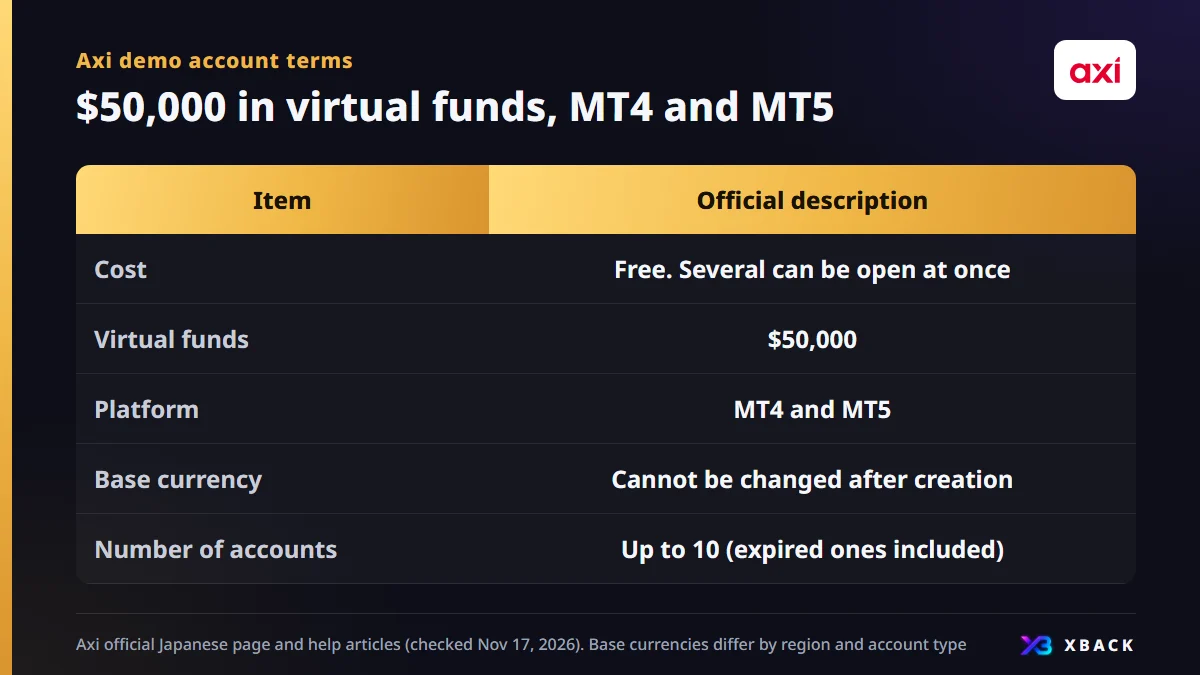
| Item | Official description |
|---|---|
| Cost | Free. You can open several at the same time |
| Virtual funds | $50,000 (Japanese page and English page) |
| Platform | MT4 and MT5 (desktop, mobile and WebTrader) |
| Base currency | Chosen when you open the account. It cannot be changed after creation |
| Number of accounts | Up to 10 accounts (expired accounts included, per the help article) |
The pages differ on the Axi app. The Japanese page describes the app as a way to research the market.
The English page reads as if you can also open a demo account on the “Axi Trading Platform”, alongside MT4 and MT5. The Japanese page alone does not tell us whether you can create a demo account in the app.
For the differences between account types, see our related column “Axi account types compared”.
How to open an Axi demo account
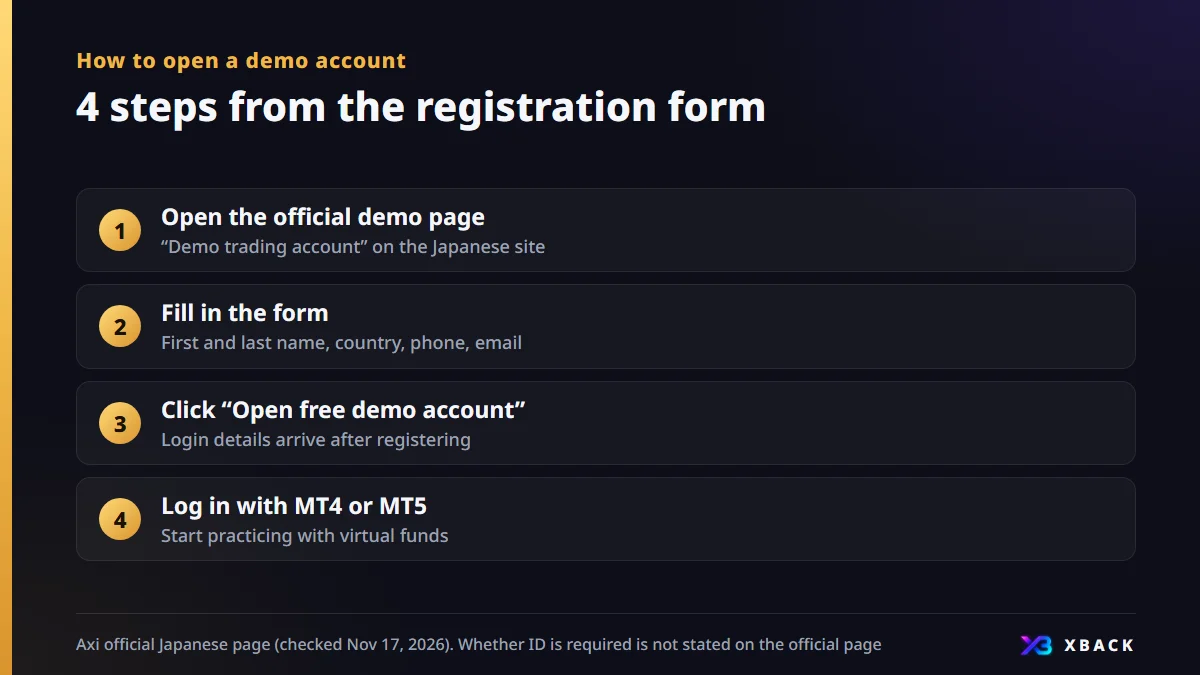
The official Japanese page has a registration form. The fields are first name, last name, country, phone number and email address.
- 1
Open the official demo account page
Open the “Demo trading account” page on Axi’s Japanese site
- 2
Fill in the form
Enter your first name, last name, country, phone number and email address, and tick the box to agree to the privacy policy
- 3
Click “Open free demo account”
After registering, your demo account login details arrive
- 4
Log in with MT4 or MT5
Use the details you received to start practicing with virtual funds
If you already use MT4, the official page says you can also create an additional demo account from the platform.
How long does an Axi demo account last? Can you extend it?
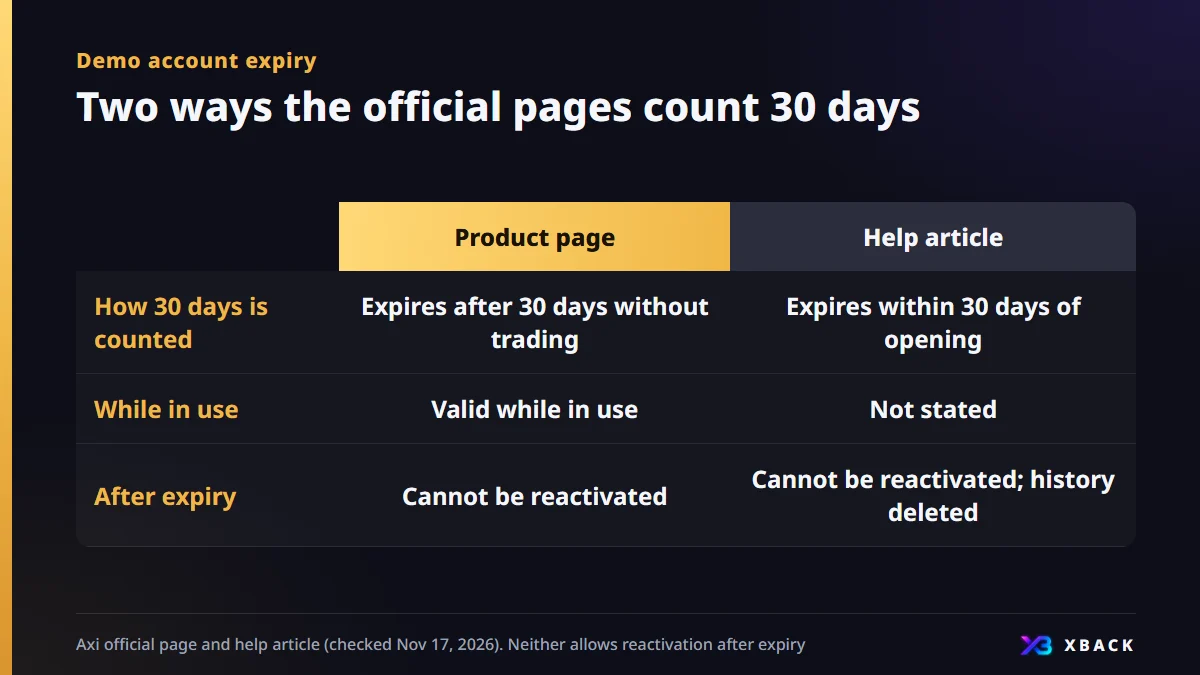
Even within the official pages, the expiry rule is described in two ways. Both say “30 days”, but they count from different starting points.
| Source | Official description |
|---|---|
| Product page (Japanese and English) | Valid while in use. Expires after 30 consecutive days without trading |
| Help article (English) | Expires automatically within 30 days of opening |
| Common point | Cannot be reactivated after expiry |
The official wording alone does not tell us which rule is currently applied. It is safest to assume the account expires 30 days after opening.
On extension, we found no procedure on the official Japanese page or in the help articles. If your account expires, you open a new demo account.
- An expired account can be neither reactivated nor have its history restored (help article)
- You can open several new demo accounts at the same time (Japanese page)
- The limit is 10 accounts, and expired accounts count toward it (help article)
- Record any test results you want to keep yourself before the account expires
Adding funds to an Axi demo account and changing leverage
The help article says traders cannot add or remove virtual funds themselves.
- Who to ask: your account manager or the Customer Success team
- What to tell them: your demo account number and the amount you want added or removed
- We could not confirm the maximum top-up amount or the response time for requests
- Changing leverage: in the account dashboard, select the demo account under “Accounts”, then choose “Change leverage” from “More options”
The help article says “demo MT4 account number”. It does not say whether the same request works for an MT5 demo account.
What you can and cannot check on an Axi demo account
Axi says conditions such as real-time spreads, tradable products (excluding stock CFDs) and execution speed are the same on demo and live.
- Spreads and swaps: Standard and Pro demo accounts match the corresponding live accounts
- Getting used to the platform: you can try placing orders, charts and MT4/MT5 tools with virtual funds
- Execution and slippage: demo has no slippage and does not fully reproduce market liquidity. Results may differ from live
- EAs (automated trading): we could not confirm on the official pages whether they run on demo. If you plan to use one, ask support
Because demo has no slippage, demo results and live results may differ. This warning is based on Axi’s own explanation.
For the general differences between demo and live, see the article “Demo vs live accounts at overseas forex brokers”.
Before moving from demo to a live account
- A demo account uses virtual funds only. Its results do not indicate profits on a live account
- Terms differ by account type. See “Axi account types compared” for how to choose
- For deposits and leverage, see “Axi minimum deposit and leverage limits”
- The account opening flow is covered in “How to open an Axi account”
- Conditions for opening via XB are on the broker page. XB cashback for this broker is not open yet, and eligible accounts and rebate amounts will be listed when sign-ups open
Eligible live accounts and rebate amounts will be shown on Axi’s broker page when sign-ups open.
View Axi detailsFAQ
Q.How long can I use an Axi demo account?
Axi’s product page says the account stays valid while in use and expires after 30 consecutive days without trading. The help article, however, says it expires within 30 days of opening. Because the descriptions differ, it is safest to assume it expires after 30 days.
Q.Can I extend an Axi demo account?
We found no extension procedure on the official Japanese page or in the help articles. An expired demo account cannot be reactivated, so you open a new one. You can have up to 10 accounts, expired ones included.
Q.How much virtual money does an Axi demo account have?
The official page states $50,000 in virtual funds. You cannot add funds yourself. For additions or removals, tell Customer Success or similar your account number and the amount.
Q.Do I create an Axi demo account on MT4 or MT5?
On the official Japanese page, you choose MT4 or MT5 when you open it. They work on desktop, mobile and WebTrader. The Japanese page describes the Axi app as a way to research the market.
Q.What is the difference between an Axi demo account and a live account?
Demo uses virtual funds, so profits and losses are virtual too. Axi says Standard and Pro demo accounts have the same spreads as live. Slippage is not reproduced, though, so results may differ from live.
Sources
- Axi official page “Demo trading account” (Japanese) (checked 2026-11-17)
- Axi official page “Demo account” (English) (checked 2026-11-17)
- Axi help “Does a Demo account expire?” (English) (checked 2026-11-17)
- Axi help “How many demo accounts can I create?” (English) (checked 2026-11-17)
- Axi help “How do I add / remove funds from a Demo account?” (English) (checked 2026-11-17)
- Axi help “Differences between live and demo accounts” (Japanese) (checked 2026-11-17)

This article is for information purposes only and is not investment advice. Conditions may change, so please check each broker's official page for the latest information. Offshore FX and CFD trading carries a risk of losses exceeding your principal.