Exness Swap-Free: Eligible Symbols, Conditions and Why It Ends
Not sure which symbols and conditions apply to Exness swap-free?
Outside the 33 Islamic countries, swap-free covers only the listed symbols: major and key minor pairs, gold, oil, all crypto and all stock indices. Every account type has it on by default, but heavy overnight holding can cost you eligibility.
We checked the official Help Center (Japanese) on November 14, 2026. Below: the symbol list, why eligibility ends, how to check it, and how swap is calculated when it applies.
Key takeaways
- Exness swap-free covers all account types and is on by default, but only for certain symbols.
- It depends on trading activity, and carrying large amounts of orders overnight may end it. The threshold is not confirmed in the public help.
- You can check the status in the Trading conditions tab of the PA and the treatment of each symbol in the contract specifications, and the PA notifies you if your eligibility changes.
Summary: Exness swap-free conditions
- Only listed symbols are swap-free: 8 majors, 21 minors, 7 commodities including XAUUSD and USOIL, all crypto and all stock indices, among others
- Swap is charged on the other metals, energies, stocks and so on
- All five account types are swap-free by default, across your whole Personal Area (PA)
- Regularly holding large positions overnight can cost you eligibility, and the PA notifies you when it changes
- Swap-free on every product is reserved for accounts from 33 listed Islamic countries; Japan is not on that list
How swap-free works and which account types are covered
- The official Help article “Swap-free” says the status applies to every account type in the whole PA
- Every account is swap-free by default. However, only certain symbols are actually swap-free
- Exness reserves the right to revoke the swap-free status on any trading account
- Once it is suspended, swap applies to open and future orders
- An exception by account type could not be confirmed on public help pages (November 14, 2026)
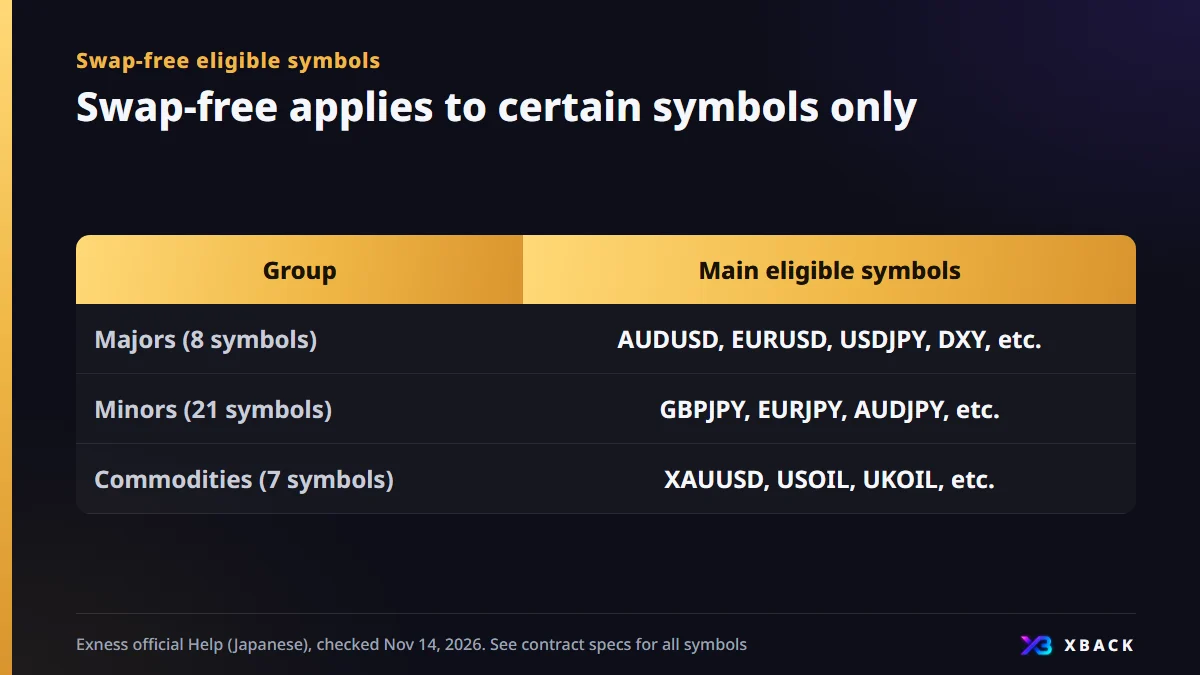
Exness swap-free eligible symbols
| Group | Swap-free symbols (original wording of the official Help) |
|---|---|
| Majors (8 symbols) | AUDUSD, EURUSD, GBPUSD, NZDUSD, USDCAD, USDCHF, USDJPY, DXY |
| Minors (21 symbols) and exotics | AUDNZD, AUDCAD, EURCHF, GBPJPY, GBPAUD, GBPCAD, CHFJPY, AUDCHF, AUDJPY, EURAUD, EURCAD, EURGBP, EURJPY, EURNZD, GBPCHF, GBPNZD, NZDJPY, NZDCAD, CADCHF, CADJPY, NZDCHF / Exotics: USDZAR, USDTHB |
| Commodities (7 symbols), cryptocurrencies and indices | XAUUSD, XAUAUD, XAUEUR, XAGUSD, XPTUSD, USOIL, UKOIL / all cryptocurrencies / all stock indices |
Some help articles describe a wider scope. "About swap" says no swap is charged on any product, and the overnight fees article says swap is reduced on most instruments.
Exness does not explain the difference. If you plan to hold a symbol that is not in the table above, check it in the contract specifications in your PA.
Why eligibility ends and how you are notified
- The official Japanese Help says swap-free is applied based on trading activity
- Mainly, if you rarely trade during market hours and regularly hold large amounts of open orders overnight, it may not apply
- Compliance is checked by an algorithm that analyses trading patterns, in line with the agreement on trading conditions
- To keep it, you are advised to focus on intraday trading and keep orders carried over to the next day to a minimum
- The lot size or number of orders that counts as “large” could not be confirmed on public help pages (November 14, 2026)
How to check your swap-free status in the PA
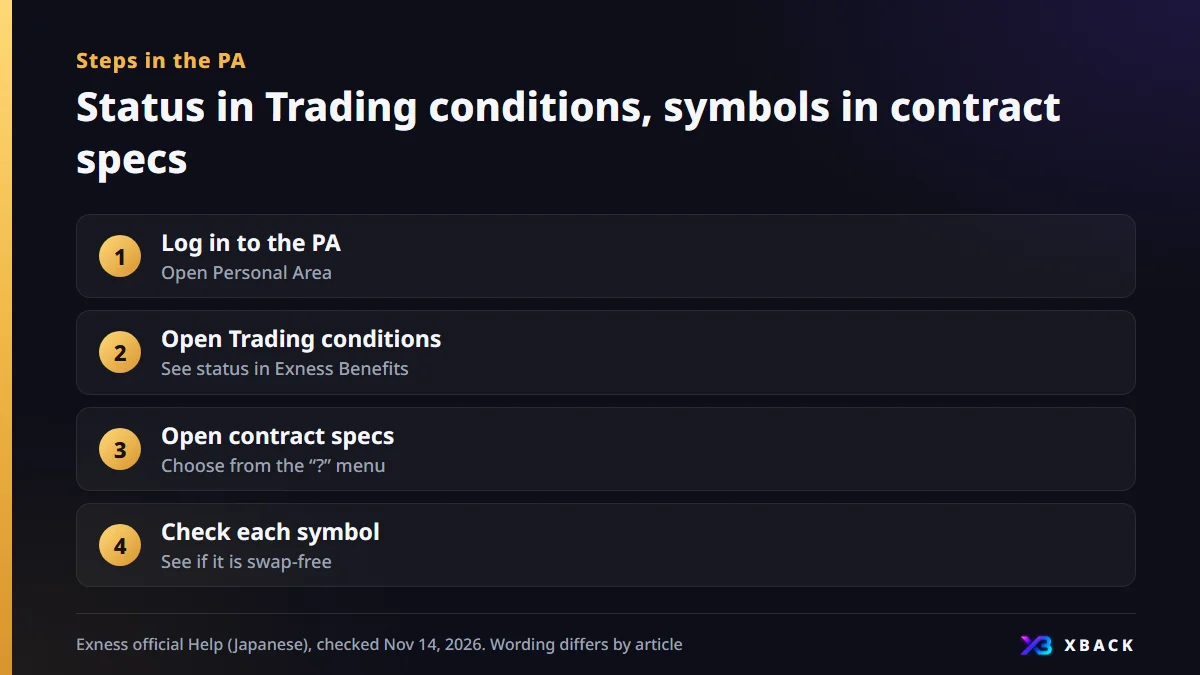
- 1
Log in to the PA
Sign in to your Exness Personal Area (PA).
- 2
Open the Trading conditions tab
Check the swap-free status in the “Trading conditions” tab under “Exness Benefits”.
- 3
Open contract specifications
From the trading menu (in the dropdown under the “?” icon at the top right), choose “Contract specifications”.
- 4
Check each symbol
On the contract specifications page, check whether the instrument is swap-free.
The Trading conditions tab shows your account-wide eligibility; contract specifications show how each symbol is treated. Screen names may change, so go by what your PA shows.
When swap is charged: calculation and triple-swap days
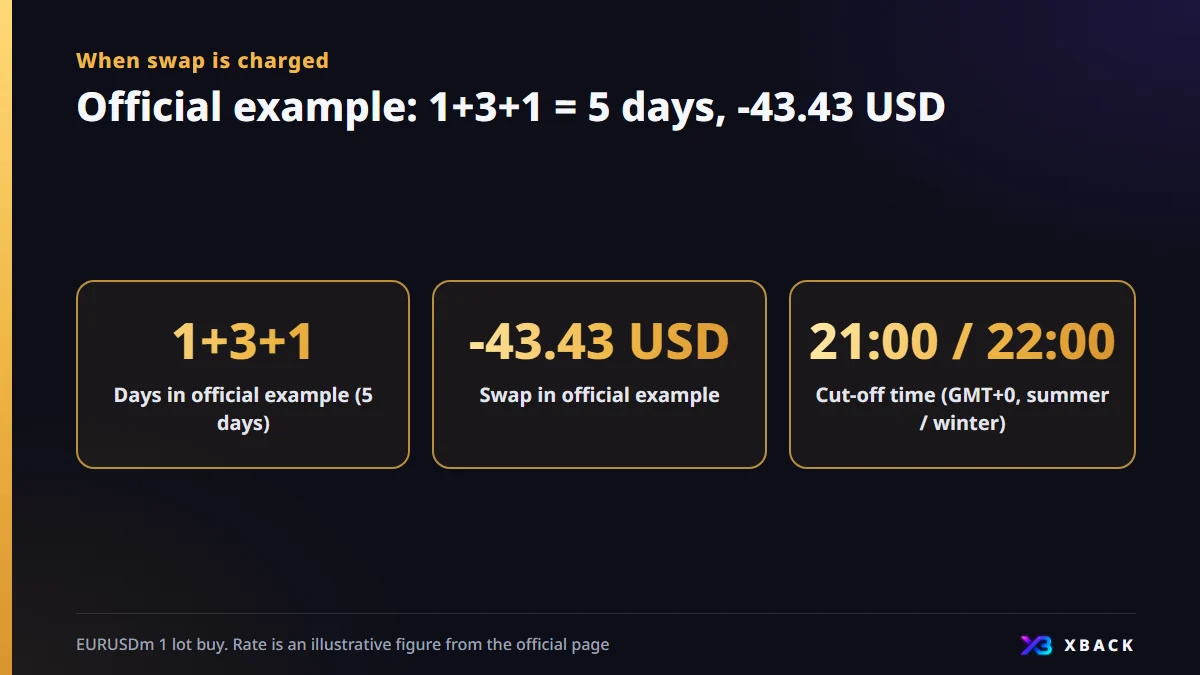
Swap is an overnight fee deducted from equity. The cut-off time is 21:00 GMT+0 in summer time and 22:00 GMT+0 in winter time. It applies Monday to Friday and not on weekends.
| Triple-swap day | Product group (official table) |
|---|---|
| Wednesday | Forex (except USDCAD), metals and cryptocurrencies (crypto crosses only) |
| Thursday | USDCAD |
| Friday | Indices, stocks, other cryptocurrencies and energies (no triple swap for XNGUSD) |
The official formula is “Swap = long/short swap × number of days × pip value”. Pip value is “number of lots × contract size × pip size”.
Checking the official example
The official example is a 1-lot buy of EURUSDm held from 15:00 on Tuesday to 23:00 on Thursday. That is 5 days (1+3+1), and the rate is -0.86852 pips, a figure for illustration. With a pip value of 10 USD, -0.86852 × 5 × 10 = -43.426, which matches the official result of about -43.43 USD.
The official pages explain that most products take up to 2 business days to settle, so carrying a position over a weekend charges 3 days at once. This applies to symbols that are not swap-free, or if eligibility ends.
How it differs from Islamic (swap-free for Islamic countries) accounts
- Accounts registered from Islamic countries are automatically given the swap-free status. The official list is 33 countries
- Under that status, swap is zero (not applied) on all trading products
- The statuses for non-Islamic and Islamic countries cannot be switched between each other
- Japan is not in the official list of 33 countries. We could not find a sentence stating which one Japan falls under
Account types, deposits and withdrawals, and cashback information are on the Exness broker page.
See the Exness broker pageFAQ
Q.Does Exness swap-free apply to all symbols?
No. The official Help article "Swap-free" covers major pairs, some minor pairs, 2 exotic symbols, some commodities, all cryptocurrencies and all stock indices, and says swap is charged on everything else.
Q.Is swap charged if I hold USDJPY or XAUUSD overnight?
Both are on the eligible list in the official "Swap-free" article, so no swap is charged while you remain eligible. If eligibility is removed, swap applies to open and future orders.
Q.What ends swap-free on Exness?
It depends on trading activity. The Japanese Help says it may not apply mainly if you do not trade during trading hours and carry large amounts of orders over to the next day. The numeric threshold is not in the public help. You are notified in the PA when it changes.
Q.Where can I check my Exness swap-free status?
You can check it in the “Trading conditions” tab under “Exness Benefits” in the PA. How each symbol is treated can be checked in “Contract specifications” in the trading menu (under the “?” icon at the top right). The wording differs by article.
Q.What is the difference between an Exness Islamic account and regular swap-free?
The Islamic-country status is given automatically to accounts registered from 33 countries, and swap is described as zero on all products. Regular swap-free covers certain symbols only. The two cannot be switched, and Japan is not in the list of 33 countries.
Sources
- Exness Help Center “Swap-free” (checked 2026-11-14)
- Exness Help Center “About swap” (checked 2026-11-14)
- Exness Help Center “Does Exness charge fees on overnight orders?” (checked 2026-11-14)
- Exness Help Center “Swap-free for Islamic countries” (checked 2026-11-14)
- Exness Help Center “Trading account types” (checked 2026-11-14)

This article is for information purposes only and is not investment advice. Conditions may change, so please check each broker's official page for the latest information. Offshore FX and CFD trading carries a risk of losses exceeding your principal.